Executive Assistants
Executive assistant daily checklist: What they do in 1 day
Jul 25, 2024
5 min read


If you’ve never had an executive assistant, you may not know how or where to start delegating. Use this executive assistant daily checklist as a point of departure or tailor it to your specific needs.
The best part of knowing that your executive assistant can tackle all of these tasks in one day is knowing that you won’t have to anymore. Can you imagine how much time this will free up in your calendar? Some of our customers report saving more than three hours every day since they onboarded an executive assistant.
How productive are you? Take our 3-minute quiz to find out (and see what to do next).
Use those hours to pick up an initiative that fell through the cracks, work on a big project you haven’t had time to finish, or simply log off in time for dinner. This executive assistant daily checklist is the first step in making all those things happen.
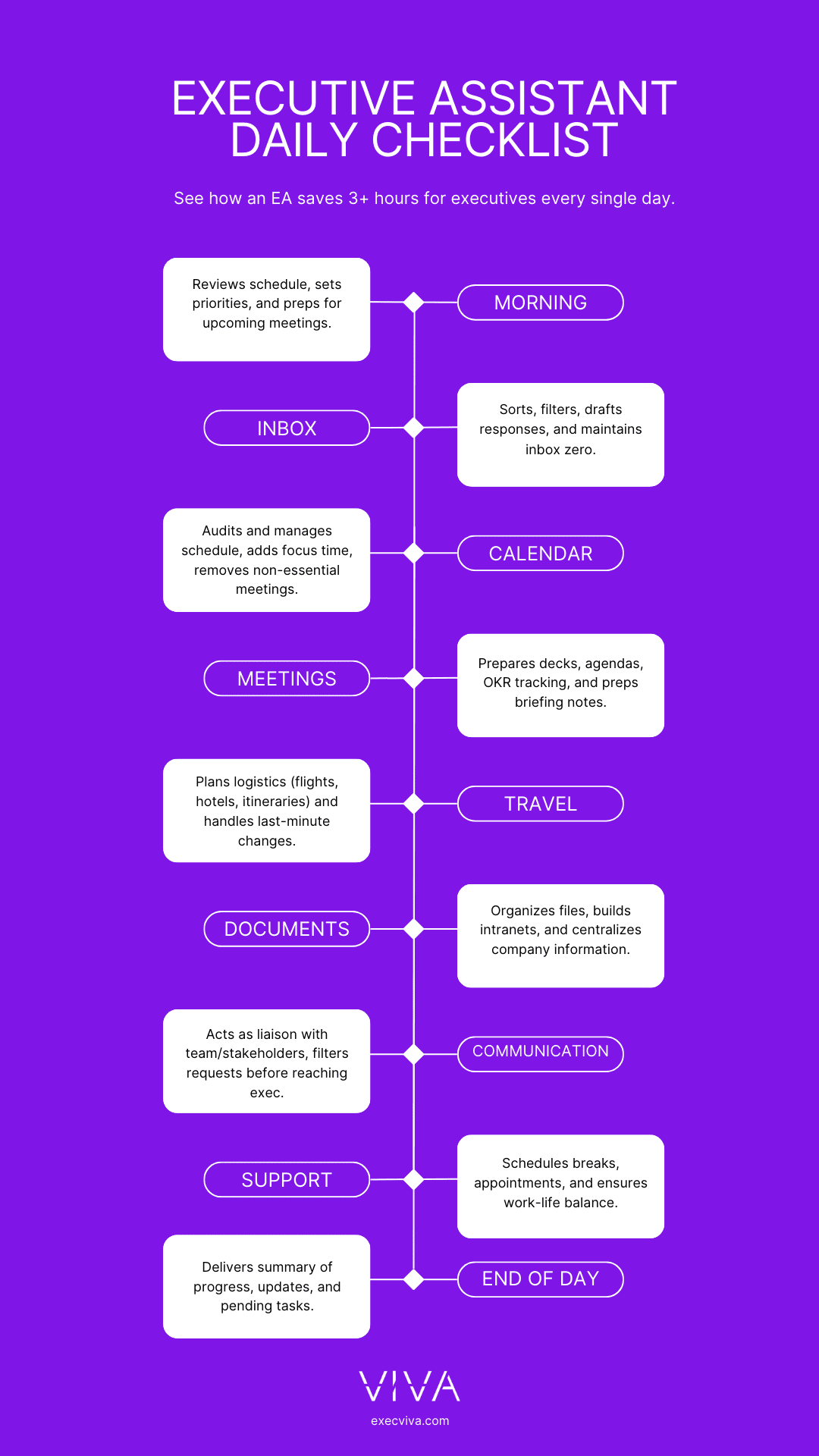
Table of contents
- Establish a morning routine and prioritize tasks
- Manage your email, calendar and handle meeting prep
- Arrange travel and manage documents
- Provide comms and personal support
- Conduct an end-of-day review
-
Establish a morning routine
At Viva, we support hundreds of executives from American startups, and our work has shown us there is no single “right” way to stay productive. Some executives like to plan their week ahead of time. They use a few hours on Saturday morning or Sunday evening to plan the week ahead. Some choose to plan on a day-to-day basis instead: they plan the next day just before they log off. Still, others prefer to start their day a few hours before the rest of their team to avoid distractions.
But what if that wasn’t needed? What if your executive assistant could do that for you so you could focus on resting after hours? Outstanding executive assistants have a very strict morning routine, which they use to review their executive’s schedule, prioritize tasks based on level of importance and urgency, and prep for upcoming meetings.
Imagine what it would feel like to have your whole day planned out to perfection before you even log on. One of our executive assistants takes the initiative when she notices that her executive has been working irregular hours. If he stays late one night, she reschedules his early morning meetings, allowing him to start the day a bit later.
-
Manage email
How can you ever achieve inbox zero when every time you check your phone, dozens of new offers, newsletters, meeting updates, and cold emails demand your attention? Email is usually a time-consuming challenge for startup executives.
An executive assistant daily checklist that doesn’t contain email management is missing a decisive factor that contributes to your success.
Here’s how our executive assistants manage their executives’ emails, and how yours can too, with these 5 steps to perform an inbox sweep and achieve inbox zero:
- Set a time frame: Determine the relevance of an email by setting a time frame (e.g., 2 months or older) and flag them as read.
- Identify recurring communications: Recognize regular senders such as team members, board members, and vendors.
- Filter trash: Remove irrelevant marketing communications and uninteresting sales emails.
- Segment your email: Categorize emails based on your professional needs (e.g., internal, external, prospects).
- Create labels: Sort all your categories into their corresponding labels such as: “archive”, “meetings” and “response needed”.
-
Manage your calendar
Viva executive assistants are experts in performing calendar rehauls. They don’t make any assumptions; instead, they challenge you to consider everything that is currently on your calendar. They don’t automatically carry over existing commitments; rather, they reevaluate each meeting and appointment. An outstanding EA will ask you three questions: Is this meeting necessary? How long should it be? How often should it occur?
You and your EA should revisit this process at the beginning of each quarter. In this way, you’ll only spend time on your calendar four times a year, the rest of the time it will be entirely your EA’s priority, and you won’t even have to think about it. This is how:
- Start from scratch: Delete everything from your calendar.
- Prioritize personal time: Allocate time for lunch, picking up your kids, or other important personal activities.
- Schedule focus time first: Set aside time for focused work before scheduling anything else. Don’t let focus time become an afterthought.
- List key contacts: Make a list of all the people you need to sync with regularly (e.g., vendors, prospects, customers, etc.)
- Create recurring meetings wisely: Set up recurring meetings only with essential team members, such as direct reports or your leadership team.
- Shorten meetings: If your recurring meetings were one-hour long last quarter, reduce them to 45 minutes. If they were 30 minutes long, try 25 minutes, and so on.
-
Prioritize tasks
The Viva productivity funnel helps you evaluate the importance and urgency of tasks by categorizing them into four sections: urgent, not urgent, important, and not important.

Here’s how some of our customers have applied this approach:
- Schedule weekly leadership meeting prep: By doing this, the EA ensures her executive is well-prepared for any meeting.
- Delegate the onboarding process: One EA identified a need in her executive’s role and, upon raising it, was delegated the task of creating the entire onboarding process.
- Prioritize external meetings: An EA noticed her executive wasn’t spending enough time with customers and proposed a calendar overhaul to prioritize these meetings.
- Eliminate knee-jerk reactions: Constantly checking email or Slack can kill productivity. One EA assigned two daily time slots for her executive to check notifications.
-
Handle meeting preparation
More and more executives are delegating meeting prep and even meeting facilitation to their executive assistants. If you’re not ready to let them take over, this is how they can help you prep for all kinds of meetings: from 1:1s to board meetings:
- Deck support: Assist the executive and other C-level leaders in preparing the presentation deck that outlines the company’s strategy and direction. Ensure alignment on vision and goals, follow up on deadlines, and communicate any changes in the deck’s outline or proposals.
- OKR tracking: Conduct weekly OKR tracking and compile information from various team leads to ensure coherent data by the end of the quarter.
- Focused time blocks: Schedule focused work periods in the executive’s calendar and turn off notifications to minimize distractions, allowing them to concentrate on board meeting preparations.
- Delegating tasks: Determine which other team members can take on tasks and meeting leadership to free up the executive’s bandwidth and reduce stress.
- Travel planning: Coordinate travel arrangements for all executives, especially those on remote teams. This includes booking flights, hotels, and dinners, and managing schedules and logistics.
- Monthly operational reviews: Create a review with specific metrics to showcase departmental performance and opportunities, helping the executive highlight achievements and challenges to the board and other C-level executives.
- Send materials to invitees: Send meeting materials 24-48 hours in advance to allow participants to review and prepare questions. The EA ensures the deck is ready by a specific deadline and coordinates with the team.
-
Arrange travel
All our executive assistants attend extensive training when they join Viva, and that training includes exercises in offsite planning for several cities. That’s why, when planning a trip for their executives, Viva EAs have a vast amount of resources to make trip planning as smooth as possible.
Exceptional travel planning can require hours of extensive research and several iterations between the executive and EA. A highly effective EA, however, can make this process easier and faster, with better outcomes. For example, one of our executive assistants manages to travel plan asynchronously with just three clicks.
This EA created a series of Notion pages that she shares with her CEO before booking. These pages include airline, hotel, and restaurant options. Her exec simply clicks on his preferred choices to approve them. She then handles bookings, planning the entire trip from start to finish with minimal involvement from the executive, requiring less than five minutes of his time.
-
Manage documents
Executive assistants are great proxies for document management. One of our executive assistants noticed employees were repeatedly asking for basic information on the company’s policies. Her executive asked her to centralize all that information; the EA’s solution was to proactively create an intranet that included team pages, marketing resources, the employee handbook, FAQs, key documents, and more.
If you spot a documentation issue, ask your EA to add it to their executive assistant daily checklist. They will tackle it with the utmost attention to detail and become the point person for the entire company, relieving you of that responsibility.
-
Provide communication support
One of the most impactful support areas of an executive assistant is how quickly they can build bridges between you and your entire organization. They are key in nurturing relationships with your direct reports and cultivating new connections with key stakeholders.
When you’re one of the leaders of the company, everyone wants to get time on your calendar, and they all believe that what they have to say is truly urgent. If you simply don’t have the time to jump in one meeting after the other, delegate team comms to your executive assistant.
Your EA can gather feedback and requests from all team members, take care of the ones that don’t need your direct action or input, and make you look more available and responsive.
-
Provide personal assistance
We always advise executives to leverage their EAs on business-related matters, but it is probably the case that your pain points aren’t just work-related. Most executives face challenges with establishing and maintaining a work-life balance. A good executive assistant always has your best interests at heart and will support you in personal aspects, if you need them to.
They will allocate time in your calendar so you can have lunch, take breaks between meetings, pick up your kids from school, and make sure you don’t miss your doctor’s appointment. An executive assistant’s daily checklist will always account for your personal well-being.
-
Conduct an end-of-day review
Your executive assistant does a lot without you even knowing about it. At the end of the day, they will send you a detailed review of everything that happened, whether via a Slack message or, if it’s your preference, a quick 1:1 meeting.
Hearing all the things your EA managed to accomplish or move forward in a single day will make you feel relieved about the work that’s been done and, even better, that it happened without you having to get involved in it.
If you’re thinking about bringing an EA to your team, let’s chat. We might be able to guide you in the process or at least point you in the right direction.