Executive Assistants
How to work with an executive assistant in the first 30 days
Nov 7, 2024
9 min read



How to work with an executive assistant in the first 30 days. – It happened again. It’s the end of another long day, and Priya, the CEO, sits at her desk, staring at a Slack feed that’s grown unruly, as if she hadn’t answered a single message all week. She glances over at her priority list—tasks lined up in neat rows, most of them untouched. How did this happen? She’s been putting in extra hours every night but progress feels out of reach.
She’s determined to get things done without burning out. Priya decides it’s time to hire an executive assistant. With an EA joining her team, she feels a mix of excitement and pressure.
How can she make sure this works? Priya knows that just having an EA isn’t enough; she’ll need to build a strong working dynamic, one where her EA can truly take on the load and free her to focus on priorities. Priya’s next step: finding the right ways to delegate, setting expectations, and empowering her EA to make a real impact.
Does this sound like you? If so, read on to learn how to make the most of your first 30 days with your EA.
Below, you’ll also find a list of 81 tasks that you can delegate to your executive assistant in the first month.

Table of contents
How to work with an executive assistant in the first 30 days
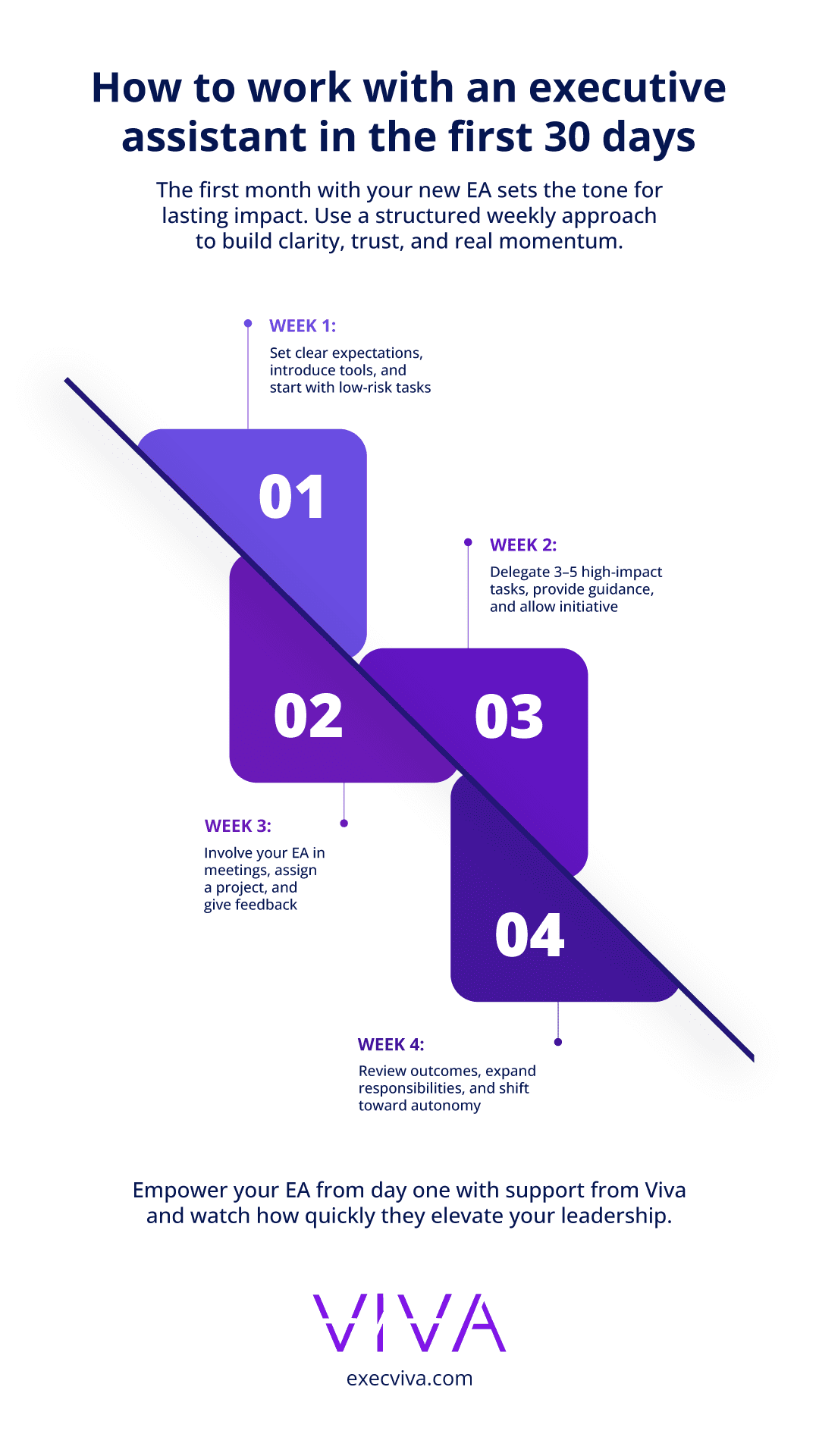
- What should you do in week 1 of working with an EA?
- What should you do in week 2 of working with an EA?
- What should you do in week 3 of working with an EA?
- What should you do in week 4 of working with an EA?
- What are the expected outcomes of working with an EA during the first month?
- List of 81 tasks that can be delegated to your executive assistant during the first
- Conclusion
We’ve divided the first 30 days of working with an executive assistant into a weekly cadence, but you can tailor the list to your needs. Some tasks, such as sharing the company context and North Star metrics, can be delegated to another team member.
For ideas on what tasks to delegate in the first month, refer to the list at the bottom of this blog.
How to work with an executive assistant: what should you do in week 1 of working with an EA?
In her first week, Priya quickly learned that her EA was more than an aide who would handle her calendar and manage her inbox; the EA was Priya’s partner in achieving her vision for the company. They focused on getting to know each other, discussing work preferences, and establishing a communication cadence. The EA asked insightful questions that made Priya reflect on her daily routines and strategic goals. Priya felt a renewed sense of clarity by the end of their first week working together.
Establish communication routines
- Discuss check-in preferences: Agree on daily, weekly, or as-needed check-ins to review tasks, calendar updates, and priorities.
- Set EOD reports: Set up End-of-Day (EOD) reports to keep you updated on accomplishments and challenges. These should include the tasks that were completed, those in progress, and any blockers.
Clarify daily workflows and goals
- Share your routine: Describe your working hours, focused work times, and when you prefer to be interrupted.
- Identify priorities: Outline 3-5 key goals for the month (pick them from the list below). For example, ensure each calendar event has a clear agenda, organize upcoming travel, and arrange board meeting preparations.
Start delegating calendar management
- Block out time: Discuss blocks for focused work, meetings, and personal time. Your EA can manage double bookings, adjust low-priority meetings, and set up asynchronous updates.
- Optimize meetings: Let your EA confirm agendas and follow up on action items to ensure each meeting is productive.
What should you do in week 2 of working with an EA?
During the second week, Priya recognized the importance of delegation. For example, when she had an important investor meeting approaching, her EA took the initiative to set up meeting logistics, including finding a suitable time, preparing an agenda, and ensuring all necessary materials were ready.
In another instance, her EA organized a trip to a fintech conference, handling everything from booking flights to creating a travel briefing that included key contacts and sessions Priya should attend.
By the end of the week, Priya felt more liberated from her day-to-day tasks, allowing her to concentrate on the broader strategy for her startup.
Begin delegating key tasks
- Choose 3-4 specific tasks: Assign tasks with clear objectives. For instance, delegate logistics for an upcoming investor meeting—booking travel, creating agendas, and preparing materials. Pick your preferred tasks from the list below.
- Focus on tasks that free up time: Identify tasks that are time-consuming or would benefit from a proactive approach.
Share company context
- Provide background on your role: Describe your role, the team structure, and any relevant OKRs or key metrics. (This is a task that you delegate to another team member).
- Share upcoming events: Make sure your EA is aware of significant events and deadlines that require prep work or logistics.

What should you do in week 3 of working with an EA?
Establish a feedback loop
- Set up regular reviews: Schedule weekly or bi-weekly reviews to discuss what’s working, areas to improve, and ensure goals stay aligned.
- Encourage open communication: Create space for your EA to ask questions and suggest adjustments to improve efficiency.
What should you do in week 4 of working with an EA?
Review and expand responsibilities
- Assess progress: At the end of the month, review the tasks delegated, noting any achievements or areas for improvement.
- Identify additional tasks: If the first tasks went well, expand responsibilities by adding two more from your task list that will further support your productivity. Feel free to continue using the list of 81 tasks to delegate to an EA.
What is the expected outcome of working with an EA during the first month?
By the end of the first month, your EA should be a reliable partner in managing your daily operations. The foundation of trust and clear communication you have created together will empower you to focus on strategic growth, knowing your EA can handle details efficiently.
Here’s a list of 10 specific outcomes that Priya achieved in the first month of working with her executive assistant:
- Eliminated double bookings – The EA effectively managed Priya’s calendar, ensuring that no meetings overlapped and her time was optimized.
- Decluttered inbox – Unsubscribed from unnecessary newsletters and categorized emails for prioritized responses, making it easier to focus on important communications.
- Handled investor meeting logistics – The EA took over the preparation for an upcoming investor meeting, including scheduling, creating the agenda, and gathering necessary materials.
- Simplified travel planning – Priya’s trip to a fintech conference was fully managed, from booking flights to organizing travel briefs with key contacts and sessions to attend.
- Improved meeting productivity – Each meeting was prepared with a clear agenda, and action items were followed up on well before meetings took place, improving overall efficiency.
- Established consistent check-ins – Priya and her EA set up daily and weekly check-ins to review tasks, assess progress, and adjust priorities as needed.
- Created more blocks of focused work time – The EA blocked off dedicated time for Priya’s deep work, ensuring no meetings were scheduled during those periods, leading to better focus and output.
- Organized board meeting materials – All documents and materials for an upcoming board meeting were compiled and prepared, allowing Priya to attend without last-minute scrambling.
- Delegated routine tasks – Priya offloaded regular tasks like email filtering, meeting scheduling, and minor administrative work, freeing up more time for strategic thinking.
- Implemented a clear task delegation system – Priya and her EA developed a system for tracking tasks and assigning responsibilities, ensuring no task was overlooked or forgotten.
Here’s a list of 81 tasks that can be delegated to your executive assistant during the first month:
[FREE DOWNLOAD] Get the complete list of 81 tasks to delegate to an executive assistant here.
- Ensure every calendar event has a clear agenda.
- Follow up on action items well before each meeting.
- Block focused work time and manage meeting buffer periods to avoid back-to-back scheduling (if that is your preference).
The full list includes tasks about calendar and meeting management, email and communication management, travel and event planning, investor relations and board preparation, hiring and people management, project management, and team engagement activities.