Executive Assistants
5 creative methods executives use to reach inbox zero
Feb 26, 2025
5 min read


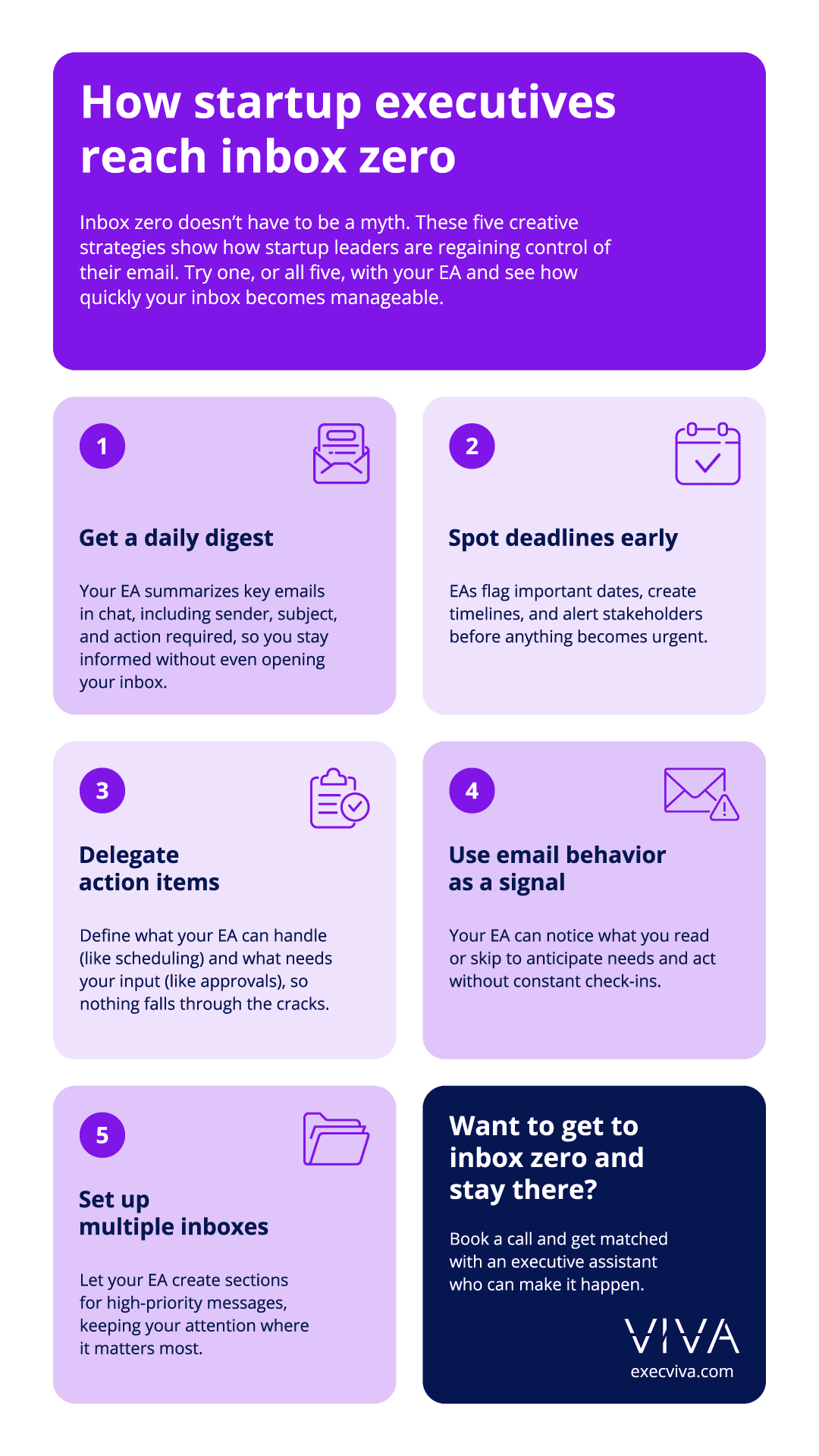
Delegating email management is the fastest way to reach inbox zero. Our customers have achieved this goal by creating entire systems with their virtual executive assistants. Their EAs establish rules, create folders, and get rid of spam in order to achieve what seems to be an impossible goal. But what else can you do in addition to following email management best practices?
One of our executive assistants was recently assigned to a new executive whose biggest pain point was—no surprise—his inbox. Here’s what the EA walked into:
- 24,000+ emails in the inbox
- 6,000+ unread emails
- 68 labels (not including sub-labels)
Instead of diving in blindly, she paused, assessed the situation, and strategized. The steps taken so far:
- Cleared old invitations using advanced search:
subject: "invitation" + in:inbox - Removed outdated Out of Office replies:
subject: "out of office" + in:all mail - Ran refined calendar searches for:
"declined","updated","synced","accepted", and"canceled" - Created a structured cleanup label called “ZZ Inbox Cleanup” with sub-labels: Archive 2022, 2023 and 2024.
After 3.5 hours of work (over two days), she managed to reduce his emails to <1,500 emails and unread emails down to ~600. Next steps include: streamlining labels (targeting 15-20 effective ones), unsubscribing from unnecessary newsletters, and observing inbox habits to implement further improvements and achieve inbox zero
We asked other Viva executive assistants about some of the most creative strategies their executives use to reach inbox zero, and this is what they told us.

Table of contents
- Getting an email digest for quick inbox updates
- Identifying deadlines before they become urgent
- Delegating action items to your virtual executive assistant
- Giving inbox visibility to your EA to stay one step ahead
- Using multiple inboxes to separate high-priority emails
1. Getting an email digest for quick inbox updates
One of our customers has a virtual executive assistant with a really effective approach. Given the fact that the executive operates in Pacific Time and her EA works in Central Time, there’s a two-hour difference for her EA to get ahead on her exec’s email before she even starts her day.
This EA reads her exec’s email every morning and sends her a single consolidated message on Google Chat containing three key pieces of information:
- Name and company of the person who sends the email
- One-sentence description of the email
- An action item (if it applies) such as:
- [Follow-up required]
- [Approval required]
- [Feedback required]
- [Action required]

This simple method saves her executive countless hours. Plus, it makes her email manageable, so she can start her day without feeling overwhelmed by an overflowing inbox. This way, she can clear her inbox without even opening her email.
2. Identifying deadlines before they become urgent
Virtual executive assistants excel at planning, and Sarah is a true expert. She meticulously scans all her executive’s emails for upcoming deadlines, forwards key dates to herself for follow-up, and sets reminders on her calendar. While the process may seem straightforward, it demands exceptional organizational skills.
A great example of her expertise is how she manages board reports. The company sends monthly board reports to its board of directors, but before that happens, several tasks need to be completed. One deadline triggers a cascade of events.
As soon as the chief of staff’s office shares the submission dates, this virtual executive assistant sets a calendar reminder for her executive, sends a Slack message to the Project Management and Strategy Teams, and schedules the internal R&C board report review.
Here’s how the timeline looks:
- R&C Dry Run: Jan 15
- Board Submission Deadline: Jan 17
- Company Dry Run: Jan 20
- Monthly Board Meeting: Jan 24

By identifying deadlines early, she ensures that her executive and all team members can complete their tasks smoothly, avoiding the stress of last-minute scrambles.
3. Delegating action items to your virtual executive assistant
Startup executives who’ve never had a virtual executive assistant might think all emails that hit their inbox need their attention. The truth is, even emails that require an action can usually be handled by somebody else. The CRO at a Series D startup experienced this firsthand when he delegated his inbox to his EA.
The exec and EA established some ground rules to determine which action items were ok for his EA to handle and which ones were sensitive enough for the executive to take care of himself.
- Tasks the EA can handle: Scheduling meetings, sharing documents, and registering for events.
- Tasks the executive must handle: Signing contracts, approvals, or reviewing agreements.
Having clarity on what falls under whose responsibility makes the process easier for both parties. The EA can do her job seamlessly and the executive won’t be bothered by unnecessary requests.
There are many ways a virtual executive assistant can help with each task. Let’s look at two examples: a one-time scenario and a daily occurrence.
Annual evaluations
When the People team decided to launch a new form of evaluation for the company, they sent out an email with instructions and deadlines. For the CRO, this meant having to do a thorough and time-consuming review. Instead, his virtual executive assistant made his life easier by:
- Flagging the email as [action required]
- Adding it to their check-in to make sure it was on his radar
- Reaching out to the sender for clarification on a few of the asks
- Setting up an Excel sheet with action items needed (such as identifying peers and stakeholders for each direct report)
- Putting focus time in her exec’s calendar to execute the evaluation process
Email response
Whenever this executive receives a long email thread, instead of having to read it all, his EA spots action items and flags them for him. This is how she does it:
- Flag the email as [action required]
- Add it to their daily check-in
- Summarize the thread
- [If applicable] Draft a response
- Add dedicated focus time to his calendar so he can respond to longer emails

4. Giving inbox visibility to your EA to stay one step ahead
Startup executives are incredibly busy, which leads to being unresponsive at times. If this sounds like you, you might want to instruct your assistant to follow this EA’s approach. This EA is so on top of her executive’s email, she gets information without even having to talk to him. She simply looks at what he does with his email, which emails he opens and which ones he ignores. This gives her enough context to understand what’s going through his head.
One recent example is when she realized her exec was in the market for a vendor without him telling her about it. How did she do it? She noticed he had just started opening cold emails for a certain type of product. She asked him about it in their next 1:1 sync and he confirmed he was actively looking. She took this in her own hands and started researching vendors who met specific criteria, set up meetings with the top three options, and made the deal easier for her executive.
This is a great way of letting your EA know what you need without actually having to tell them. Use this tip if you are constantly traveling and can’t really communicate that often, if you simply don’t like to talk so much, or if you are in a different time zone than your virtual executive assistant. They will jump in your email when you’re offline and have it all figured out by the time you wake up.
5. Using multiple inboxes to separate high-priority emails
One of our customers, a CEO at a Series B startup, uses his inbox as a task manager and doesn’t archive anything unless it’s been thoroughly reviewed and taken care of. What this means, is that his email gets cluttered quickly. His virtual executive assistant transformed this chaos into clarity by setting up multiple inboxes to separate high-priority emails from the noise.
Instead of letting everything pile up in a single inbox, this EA created a dedicated priority section for critical emails. She moved important messages, like those from legal counsel, board members, or involving strategic matters, into this high-priority space. Throughout the day, the EA monitors whether the executive has addressed these emails, sending reminders during check-ins or alerting them via Slack if something requires immediate attention.
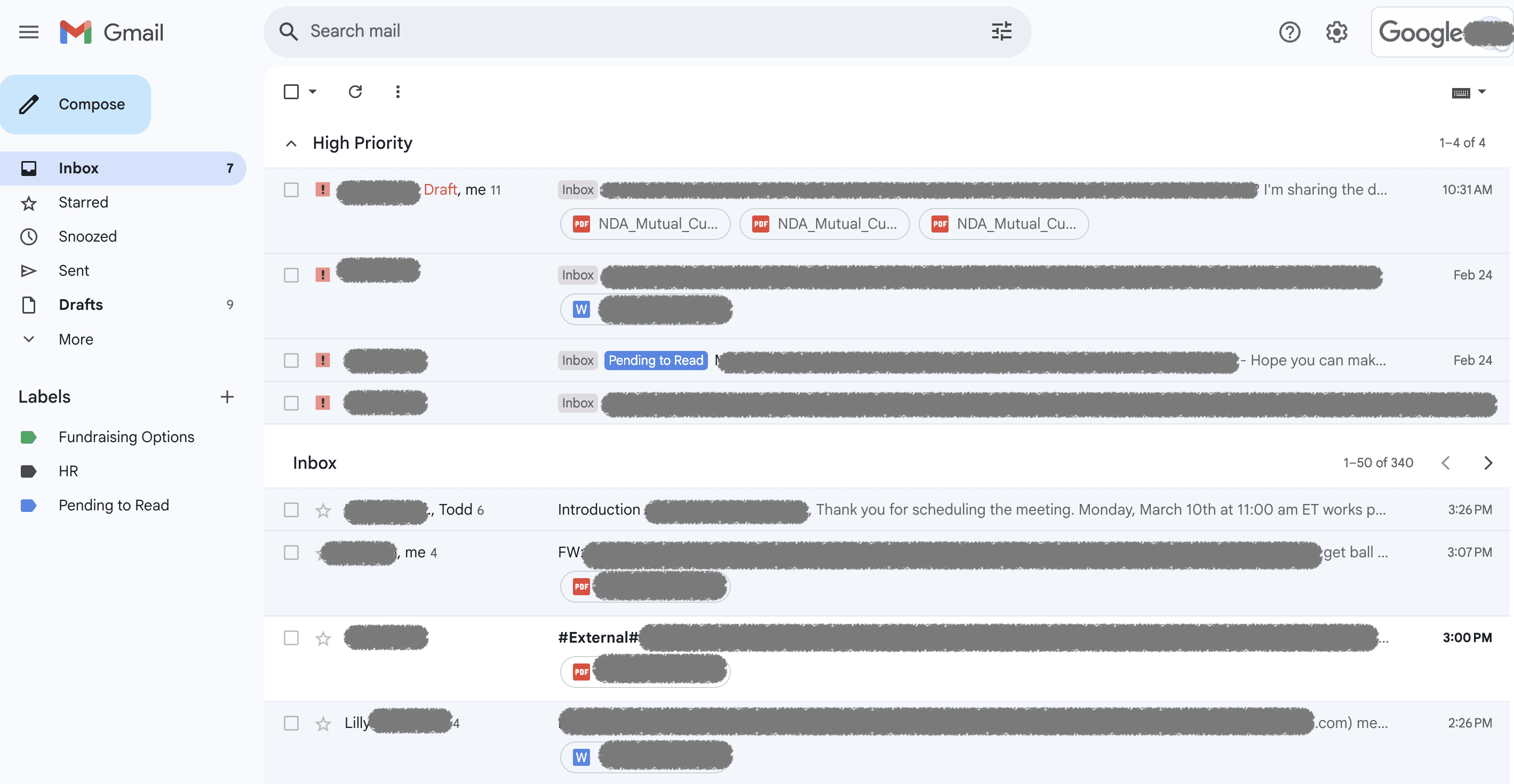
By regularly archiving non-essential emails, like newsletters, automated updates, and completed threads, the EA keeps the primary inbox clear and focused. This approach speeds decision-making and ensures important emails never get lost in the shuffle.
Ready to regain control of your inbox and your time? Connect with us and discover how a dedicated executive assistant can transform your day-to-day through email management and beyond. Book a call with our team.