Leadership
How to work with an executive assistant? Complete guide
Oct 31, 2025
5 min read


Are you working with an executive assistant? A tactical guide for executives to unlock the full potential of an Executive Assistant partnership.
Table of contents
1. Why This Guide Exists
2. What is an Executive Assistant?
3. Why do I Need an Executive Assistant?
4. How can I Find the Right EA for my Needs?
5. How can I Set Up my EA for Success?
6. How can I Build Trust and Flow with my EA?
7. How can I Delegate Effectively?
8. How to Optimize My Partnership to Maximize Value?
9. How Can I Take My EA to the Next Level?
10. How Can I Enable Longevity?
11. Resources and Templates
1. Why This Guide Exists
Most executives aren’t getting full value from their EA. I’ve distilled learnings from hundreds of executive-EA partnerships over a decade. From first-time founders to career CEOs who’ve worked with EAs for 20+ years, the patterns are consistent: the best partnerships are built, not born.
If you’re reading this, you likely have an EA and are looking to get more time back so we’ve kept this guide as concise as possible. If it falls short in any way, please feel free to send me an email directly at adnan@execviva.com so that I can fill in any gaps.
Who Should Read This
- Founders and executives who are about to work with an EA for the first time
- Leaders who have had an EA before but want to go from “order taker” to “strategic partner”
- People leaders who are trying to set up or improve an executive support function
Bottom line: You should already have an EA in your company. This guide does not focus on why you should get an EA.
What to Expect
Key topics shaped after the lifecycle of an executive-EA partnership and distilled into short, structured, skimmable content backed by real examples.
2. What Is an Executive Assistant?
An Executive Assistant is a professional who provides strategic and administrative support to a company’s executives to increase their productivity and efficiency.
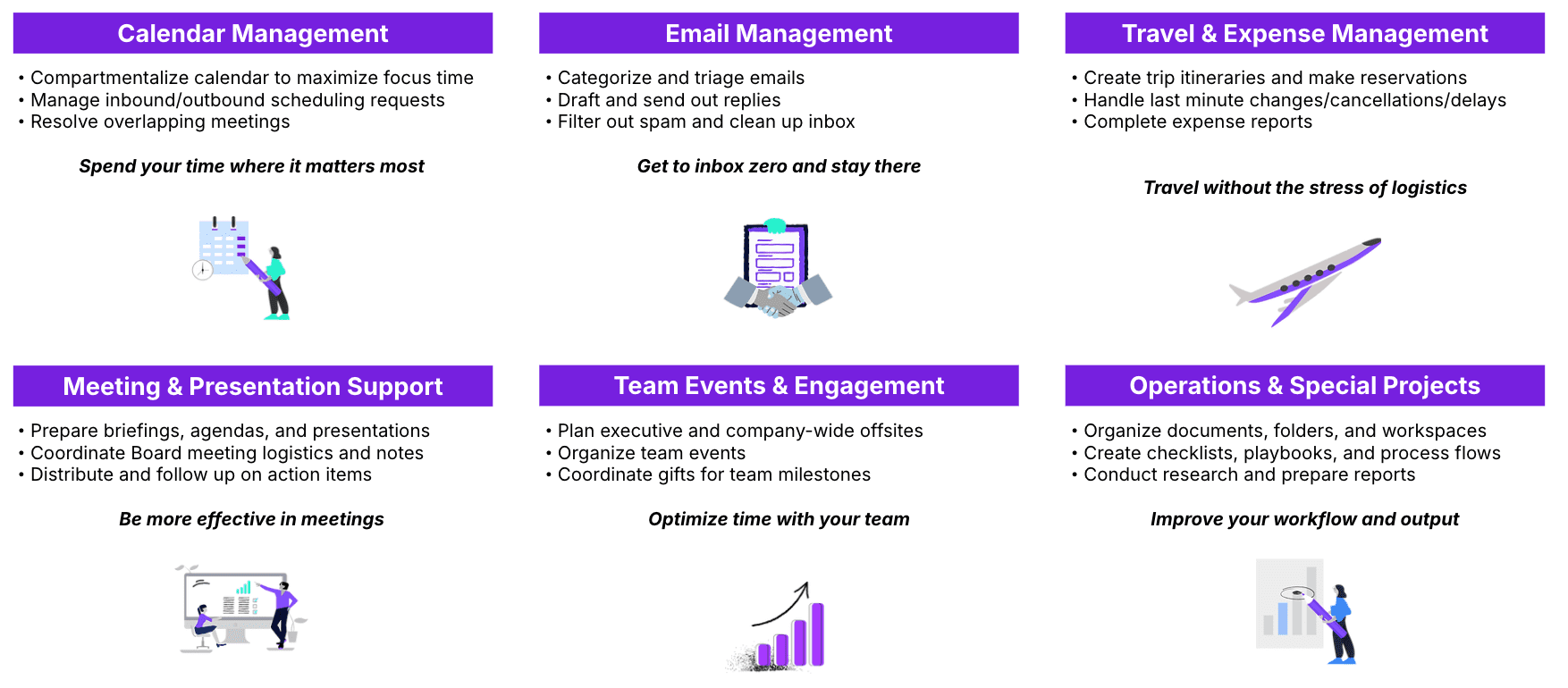
The most common areas EAs support include:
1. 📅 Calendar Management
2. ✉️ Email Management
3. ✈️ Travel & Expense Management
4. 👥 Meeting & Presentation Support
5. 🎳 Team Events & Engagement
6. 💼 Operations & Special Projects
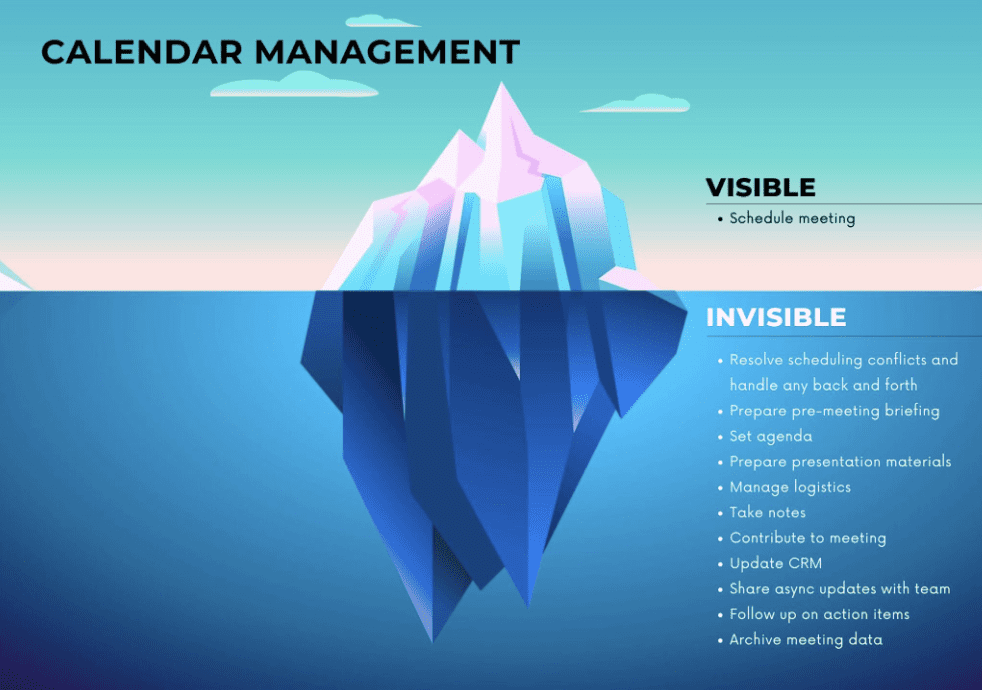
“Executives who’ve never had EA support tend to think all they do is manage calendars and plan trips. While these tasks are essential, they just scratch the surface of what EAs do behind the scenes. EAs play a pivotal role in driving organizational success, from drafting communications to creating presentations.”
Cara Silverman (Manager, Executive Support at Duolingo). Her full interview, ‘Maximize the impact you get from your executive assistant’, is here.
Here’s the exact wording in our Executive Assistant job postings:
Executive Assistant
As an Executive Assistant, you won’t just manage calendars and emails. You’ll be the right-hand, problem-solver, and strategic partner to startup executives. From operations to decision-making, you’ll take ownership, lead initiatives, and help CEOs move faster. If you love challenges, thrive in fast-paced environments, and want to make a real impact, this is the perfect role for you.
What You’ll Do
Your goal is to help executives save time and focus on strategic work. You’ll do this by:
- Being a Strategic Partner – Anticipate needs, solve problems, and keep them focused on what matters most.
- Administrative Support – Manage calendars, emails, meetings, expenses, travel, team engagement, task management, and follow-ups to keep everything running smoothly.
- Operational Support – Support internal projects, reporting, process improvements, and workflow optimization.
3. Why Do I Need an Executive Assistant?
An executive-EA partnership is a two-way street. Before beginning this relationship, it’s critical to know your ‘why’. This will set the foundation for your entire EA journey. If you don’t have a strong ‘why’, I’d recommend not working with an EA as neither you nor the EA will get full value.
Define Your Motivations
Ask yourself:
1. What do I want more of?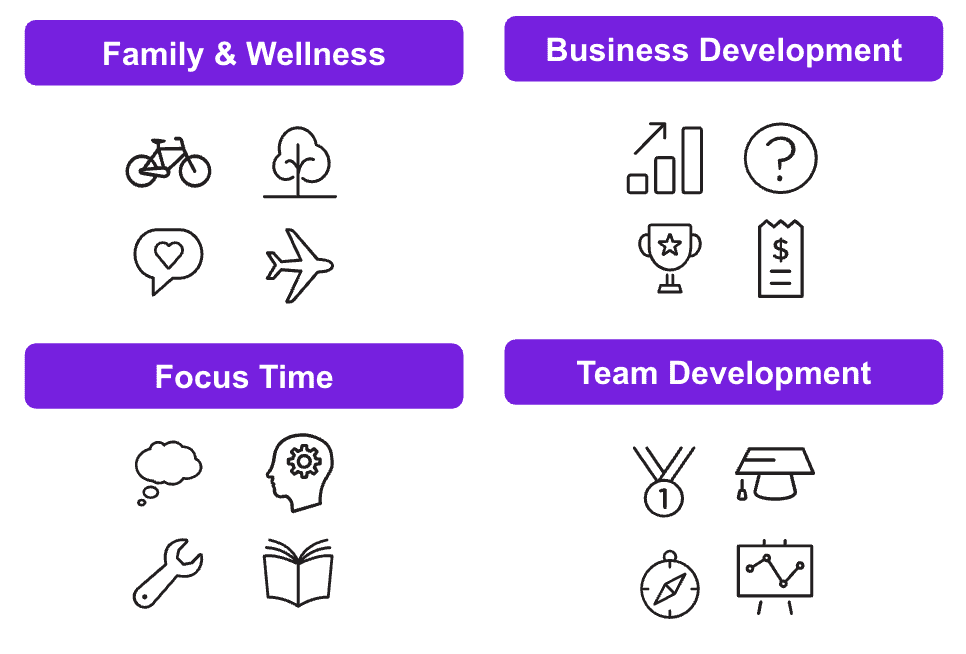
2. What do I want less of? Examples include:
- Context switching
- Time spent on busy work
- Meeting volume
- Working nights and weekends
3. What outcomes would make this relationship a success?
Reinforce Your Commitment
Partnership works only if you commit to transparency, consistency, and trust. If you’re half-in, you’ll get half the leverage or even less. You need to give 100%. That means providing context, responding to messages quickly, showing up to meetings, and giving and receiving feedback. Your EA should be given the same importance as one of your executive team members.
4. How Can I Find the Right EA for My Needs?
Understand What You Need
Define a list of must-haves and nice-to-haves across:
- 📋 Experience – Most EAs at Viva don’t have prior EA experience yet they still perform incredibly well. I’d suggest not overindexing on this unless you require something specific, like health-tech industry experience.
- ⚙️ Skills – We view 5 soft skills as table stakes: communication, attention to detail, proactiveness, problem solving, and receptiveness to feedback. Focus on any technical skills required, like using a CRM.
- 💻 Tasks – Here are some examples to get you started: 10 impactful EA tasks for all funding stages
Interview for Skills and Compatibility
The best way to understand if someone is the right fit is to talk to them directly. It’s important to ask questions to understand working style compatibility and situational questions, so that you can understand how they think. Here’s a list of sample questions: Executive Assistant Interview Questions.
Run Additional Assessments
You need full conviction that your EA is an A-player. Many executives like to do skills assessments (e.g. travel planning task) to get to this point.
5. How can I set up my EA for success?
Ensure Systems Access and Security
Set up full system access upfront. It’s understandable that you might not want to provide all access at once or in general, but this will either result in bottlenecks that you wish you had avoided or roadblocks that prevent your EA from helping you.
Must-haves
- Calendar: editor access (e.g. Google Calendar, Outlook)
- Inbox: delegate access (e.g. Gmail, Outlook)
- Expenses: admin access (e.g. Ramp, Brex, Navan, Expensify)
- Task management: regular access (e.g. Notion, Jira, ClickUp)
- Password management: regular access (e.g. LastPass, 1Password)
Nice-to-haves (recommended)
- Automation: regular access (e.g. Zapier, Make)
- CRM: regular access (e.g. Salesforce, HubSpot)
It’s also critical that you have the right security policies and controls in place. If you hire an EA through like Viva, ask if the measures below are in place. Otherwise, you can implement these yourself.
Security Checklist
- Screening: Assess ethical judgment and compliance track record through interview questions, relevant past experience, background checks, and reference checks.
- Training: Provide rigorous training on confidentiality, data privacy, and data security through real-life simulation case scenarios and quantitative assessments.
- Compliance: Sign a two-way non-disclosure agreement, enable Single Sign-On (SSO) and 2-step verification / 2-factor authentication (2FA) across all tools, ensure device encryption, and communicate a strict zero-tolerance policy for non-compliance.
- Software: Use Mobile Device Management (MDM) software (e.g. Hexnode), antivirus software, Virtual Private Network (VPN) (e.g. NordVPN), and password management tools (e.g. LastPass, 1Password) for secure transfer of confidential information such as personal, financial, or health data.
Share Goals and Preferences
- You fill out an onboarding document with the following details:
- In which areas will you need support from your Viva EA in Month 1?
- Detailed needs preferences related to calendar, email, travel & expenses, and meetings
- Submit a screenshot of a current one-week view of your calendar
- Screenshot of your team structure/org chart
- How would you measure success for your EA in Week 1?
- Your EA will review the document and prepare questions
- You meet with your EA to go through any clarifying questions and align on next steps for your top priorities and what success looks like in Week 1
- You and your EA complete the next steps and start working together
Establish Communication Rhythms
- Confirm cadence for weekly 1:1s (once a week is recommended on Mondays or Fridays)
- Align on preferred async method (Slack and Teams are the most common, but some executives prefer text messaging, WhatsApp, or email)
- Define contact method for follow-ups and urgent requests (I ask my EA to call me via Slack huddle for this and WhatsApp if it’s an emergency and I haven’t answered via Slack huddle)
Define Success and Milestones
Build a 30-60-90 plan.
Reference: How to work with an executive assistant in the first 30 days
Introduce Your EA to the Team
Context builds trust faster than instructions ever will.
6. How Can I Build Trust and Flow with My EA?
Share Maximum Context: Involve your EA in meetings and decisions. Explain the “why.”
Catch Them Doing Something Right: Reinforce initiative publicly — recognition is fuel.
Schedule the Review: When setting a deadline, be very specific (e.g. tomorrow at 5pm ET) and book a review meeting in your calendar (even better if your EA does this for you) so that you and your EA have accountability to complete an action by then. The meeting could include the EA or it could be an async reminder for you. I prefer including my EA since they know they need to show up prepared with the deliverable completed and ready to lead the meeting.
Give and Receive Feedback: Feedback is a proactive system, not a reactive event.
Giving
- Ongoing: Provide feedback on everything. No detail is too small. Tip: Record a video with screen sharing when reviewing anything to show your thought process.
- After Week 1: Confirm if the goal for success in Week 1 was achieved.
- After Month 1: Rate EA’s performance on a scale of 1-10, performance across key skills on a scale of Below, Meets, or Above Expectations, and define priorities and what success will look like for the next 3 months.
Receiving
- Ongoing: Ask “How effectively am I delegating on a scale of 1-10?” If they give you a 10, ask them to be more critical. Also, give yourself feedback so that your EA can see that you’re willing to learn more.
- After delegating a task: Ask “What would make this clearer next time?”
- Quarterly: Ask for detailed upward feedback, including questions like:
- How likely are you to recommend me as a manager to a friend or colleague? (scale of 1-10)
- Rating scale questions from “strongly disagree” to “strongly agree”
- “I feel supported”
- “I receive clear expectations and guidance”
- “I receive recognition, constructive feedback, and coaching”
- “I am treated with empathy and understanding”
- What do you value most about having me as your manager?
- What would allow me to be a better leader?
Remove Barriers and Empower Action: Set auto-approval thresholds and trust your EA to execute within them.
7. How Can I Delegate Effectively?
Identify What to Delegate
Every task that flows through your mind should have a level of urgency (i.e. due today; e.g., sending out a deck to the Board before tomorrow’s meeting) and a level of individual importance (i.e. do you specifically need to do it; e.g., leading a customer call).
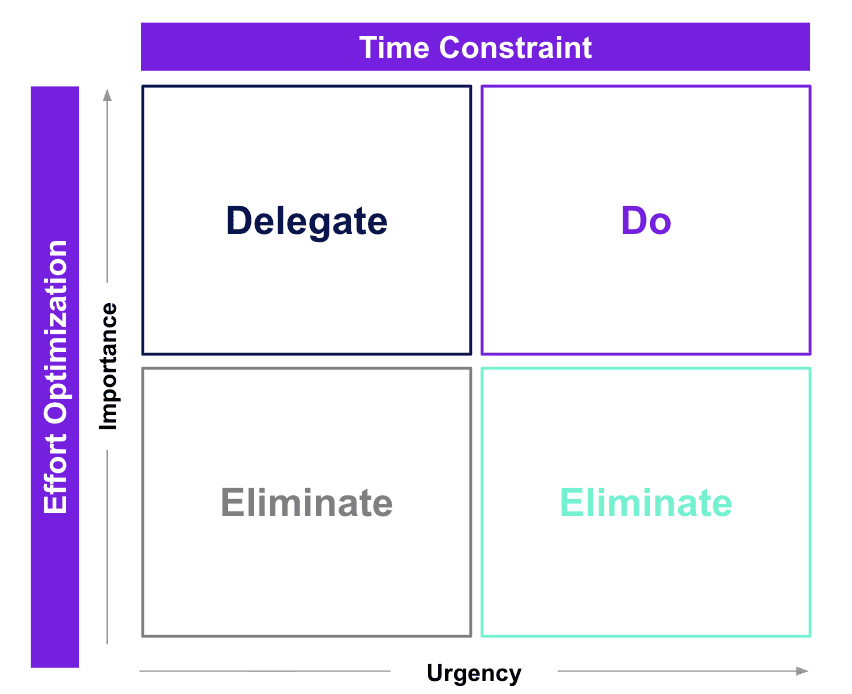
Use the Eisenhower Matrix to determine what to do with each task based on urgency & importance:
- Urgent + Important = Do
- Important + Not Urgent = Schedule
- Urgent + Not Important = Delegate
- Not Urgent + Not Important = Eliminate
Reference: 81 tasks you can delegate to an EA
Use the 5 Ws of Delegation
- What: Describe the task and expected output
- Why: Explain the task’s link to business
- Who: Assign owner, reviewer, and audience
- When: Set clear start and due dates (including any milestones like an initial review)
- Where: Specify communication channel and format
Methods of Delegation
There are 5 main methods to delegate. Each method has a different speed and level of effectiveness. Email and Slack message are the most common, yet least effective.
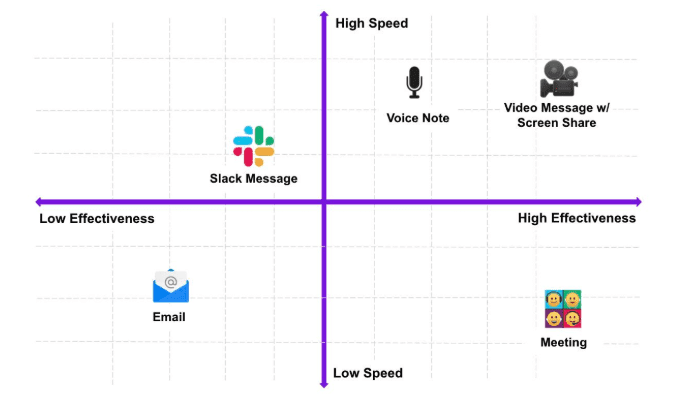
1️⃣ Email (low speed, low effectiveness)
Back-and-forth is slow, tone gets lost, and context disappears in long threads. You can’t see if someone’s read or understood it, and questions pile up instead of getting answered.
2️⃣ Slack message (high speed, low effectiveness)
It feels fast, but typing detailed instructions takes time. Slack is great for quick check-ins, not nuanced delegation. Messages get buried, and clarity suffers.
3️⃣ Voice note (high speed, medium effectiveness)
Most executives type around 50 words per minute but can speak 130-160 words per minute. That means speaking is 3x faster on average. So voice notes are faster than typing, and your tone adds context. But it’s hard to skim or reference later. Voice notes shine for simple requests, not complex ones.
4️⃣ Meeting (low speed, high effectiveness)
You get real-time questions and alignment, but at the cost of time. Meetings are best for high-stakes or strategic delegation. Not every task deserves or needs one.
5️⃣ Video message or screen share (high speed, high effectiveness)
You show and tell. No scheduling. No confusion. It scales clarity without draining time. The sweet spot for most busy execs. I recommend doing this directly via Slack (5 min limit, which is good and bad), but you can also use Vidyard or Loom.
I recommend recording everything you do and then creating an SOP with it so that your EA can do it next time. You’ll be surprised at how much you can offload with this method.
Levels of Delegation
| Level | What Happens | When to Use |
|---|---|---|
| 1. Tell | You decide and direct exactly | Accuracy critical |
| 2. Sell | You decide and explain why | Build buy-in |
| 3. Consult | You ask for input, then decide | Surface options |
| 4. Agree | Decide together | Shared process |
| 5. Advise | EA decides with input | Coaching phase |
| 6. Inquire | EA decides, then informs you | Trusted workflow |
| 7. Delegate Fully | EA owns the task end-to-end | Full confidence |
Key Idea: Don’t delegate everything. Delegate intentionally based on trust and impact.
8. How to Optimize My Partnership to Maximize Value?
Decision-making and Information Flow: Have your EA surface decisions, not just data. They’re your signal filter.
Calendar and Time Strategy: Your calendar is a mirror of priorities — your EA helps defend it.
Inbox and Communication Management: Shared visibility reduces noise.
Reference: 4 ways to delegate inbox access to your EA
Documentation and SOPs: Systematize repeatable tasks so execution never depends on memory.
9. How Can I Take My EA to the Next Level?
Expand the Scope from Admin to Operator: Delegate ownership of projects, not just tasks.
Reference: 10 impactful EA tasks for all funding stages
Involve Your EA in Planning and Decisions: Have them structure off-sites, translate goals into plans, and capture learnings.
10. How Can I Enable Longevity?
Regular Recalibration: Quarterly check-ins ensure alignment and momentum.
Invest in Growth: A high-performing EA will always be looking for growth. That doesn’t necessarily mean promotions and title changes that involve transitioning out of the EA role. In many cases, it means learning. And that doesn’t necessarily mean training.
At Viva, we’ve designed growth around the 70-20-10 model, a learning and development framework that suggests individuals learn most effectively through a combination of experiences, social interaction, and formal training.
Specifically, it proposes that approximately 70% of learning comes from on-the-job experiences, 20% from social learning and interactions with others, and 10% from formal training and education. This model emphasizes the importance of hands-on, real-world application and collaboration in skill development.
References: 5 SMART goals for your EA, How to upskill your executive assistant for long-term success
Recognize Impact: Express gratitude in:
- Words: The EA role is one that is often underappreciated and only noticed when something goes wrong. Be sure to take a minute to send your EA a thank you when they help with something or tell them when they did something you appreciate.
- Responsibility: EAs are trying to strengthen their trust battery with you. They will feel valued when you give them more complex tasks or greater autonomy.
- Compensation: Regular base pay increases and performance bonuses are key. We link the bonuses of our EAs to our own Key Result completion rates. That way, our goals are identical and our EAs will be strategic about how they support us in achieving our joint Key Results.
Plan for Transitions and Scaling: Document systems and handoffs before you need them. This will ensure you’re covered if your EA goes on PTO or leaves.
11. Resources and Templates
About Viva
Viva is on a mission to enable executives to maximize their impact while creating meaningful opportunities for women in Latin America. Viva focuses on this by hiring, training, and matching high-calibre remote Executive Assistants to leaders at high-growth companies. The team includes 200 full-time staff across 15 different countries and has customers such as Notion, Groq, and Lovable.
If you’re interested in hiring an EA through Viva, you can book a call here.
About Adnan
Adnan Khan is a co-founder & co-CEO at Viva, where he oversees the People and Customer Success functions. Prior to Viva, Adnan was at Deloitte Consulting, where he was exposed to many key ingredients for his Viva journey, including executive assistants, Latin American talent, and remote work.
Health and family are Adnan’s two biggest priorities outside of his career. He enjoys playing squash, running long distances, and cooking. Quality time is his love language and he likes to spend his time with his wife and son.
Adnan writes frequently about leadership, delegation, and executive assistants on the Viva Blog.