Remote Work
How to prevent data breaches when hiring nearshore virtual assistants
Mar 19, 2026
5 min read


TL;DR
Nearshore virtual assistants can work safely with sensitive company data when the right controls are in place. Start by classifying data and assigning least-privilege access to each task. Use enterprise tools, virtual desktop infrastructure, and strong authentication to keep sensitive systems protected. Pair these controls with continuous monitoring, access reviews, and clear incident response procedures.
When organizations combine disciplined governance with a managed nearshore assistant program that values and trains for robust safety protocols, executives can confidently delegate operational work without exposing critical systems or confidential information.
“We trust our Viva EA with highly sensitive information, both for the business and personally” – Jason Fudin. CEO at Placemakr

Table of contents
- Classify data and define access levels
- Establish onboarding policies and security training
- Use secure tools and managed access
- Implement strong authentication and password management
- Monitor access, audit logs, and revoke permissions
- Maintain security hygiene and incident preparedness
- FAQs
Nearshore virtual assistants can be a secure, scalable extension of your team if you pair great talent with disciplined controls. The goal is simple: allow high-impact delegation without exposing sensitive systems or data.
Achieving that goal starts with a clear data security framework, least-privilege permissions, and enterprise-grade tooling. Managed nearshore programs with centralized IT guardrails are inherently safer than ad-hoc freelancers. When you add rigorous vetting, multi-factor authentication, and continuous monitoring, breach risk drops significantly.
Below is a practical, executive-ready playbook you can use to get secure nearshore virtual assistant services with enterprise-grade governance, enabling leaders to offload work confidently while protecting the business.
Classify data and define access levels
Data classification is the process of categorizing information based on its sensitivity, regulatory requirements, and business impact to govern access and handling protocols. A simple, effective model mirrors the National Institute of Standards and Technology (NIST) style tiers: Public, Internal, Confidential, and Restricted. Map every VA task to a data category, then assign the minimum access required to perform the work (role-based access and least privilege).
Start your VA with Internal data only. Expand to Confidential and Restricted on a proven-competence, need-to-know basis. This staged approach reduces risk while building trust.
Example task-to-access map:
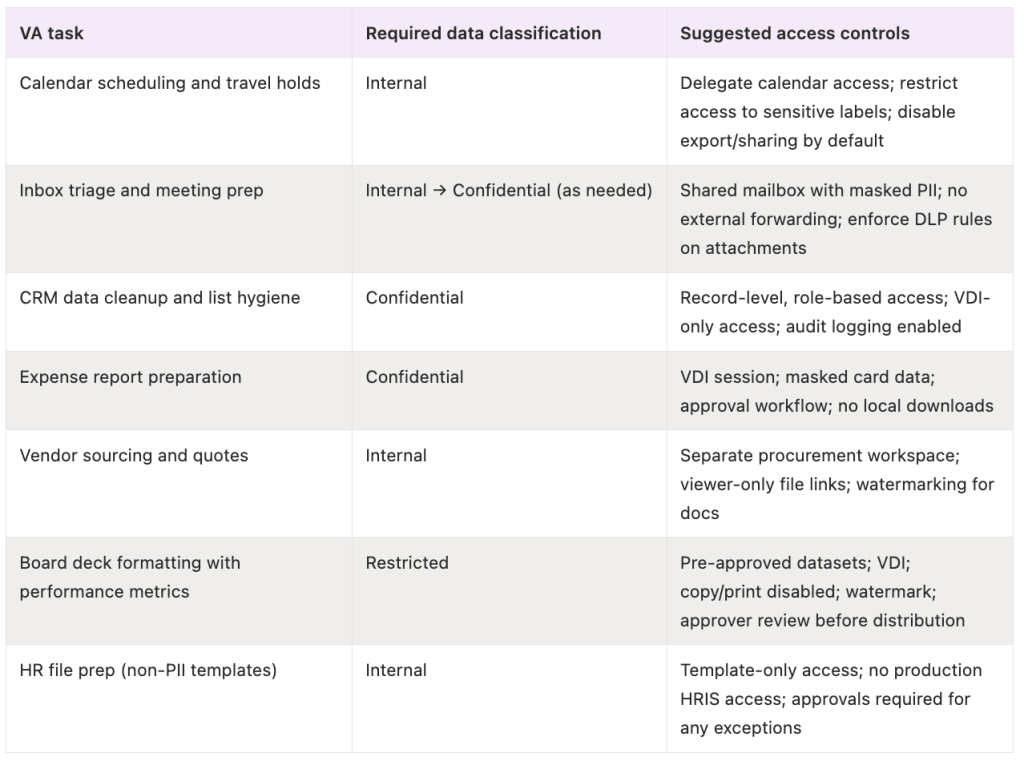
By classifying first, you can right-size permissions, isolate sensitive workflows, and avoid over-privileging from day one.
Establish onboarding policies and security training
Ensuring secure outcomes begins with a consistent, written onboarding process. Provide every nearshore VA with company security policies, your data classification guide, and task-specific handling rules on day one.
Require background checks and signed non-disclosure agreements to verify credibility and formalize confidentiality obligations, a standard emphasized in guidance on how VAs maintain confidentiality and prevent breaches.
Training is equally critical. Run initial security awareness training on day one, followed by quarterly refreshers that include phishing simulations to build a “human firewall.” Align expectations for device hygiene (patched OS, full-disk encryption, antivirus), remote-work norms, and breach reporting paths.
Onboarding essentials (quick checklist):
- Completed background check (identity, employment, relevant criminal checks by jurisdiction)
- Signed NDA and confidentiality/IP clauses
- Acceptable use policy and data classification policy acknowledgment
- Device hardening: OS updates, disk encryption, endpoint protection, auto-locks
- Identity setup: company email, identity provider account, MFA enrolled
- Password manager seat provisioned; no credential sharing via email
- Access provisioned by role (least privilege), documented in a system of record
- Day-one security training + phishing simulation baseline
- Clear incident reporting and escalation procedures
Use secure tools and managed access
Managed access means all sensitive company operations occur within IT-supervised applications or secured environments, limiting data exposure from personal or unmanaged endpoints. Favor enterprise platforms you can govern: Viva Talent for executive support, Google Workspace or Microsoft 365 for identity and productivity, Slack or Teams Enterprise for communications, 1Password or Bitwarden for credential management, and Okta or Azure AD for single sign-on and centralized policy enforcement.
Virtual Desktop Infrastructure (VDI) such as Azure Virtual Desktop or Amazon WorkSpaces keeps sensitive data inside a controlled environment (no local copies) and enables immediate session termination if a device is lost or compromised.
Use secure file sharing (Viva, Google Drive, or Dropbox Business) with strict permissioning, version history, and audit trails; enable link expiry, viewer-only access, and watermarking for sensitive documents.
For communications, prefer end-to-end encrypted chat for highly sensitive topics and enforce TLS-secured email with data loss prevention rules for attachments, as outlined in virtual assistant security best practices.
Implement strong authentication and password management
Weak authentication is a leading breach vector. IBM’s Cost of a Data Breach Report confirms that stolen/compromised credentials were the most common initial attack vector (16% of breaches) and took the longest to detect (292 days on average). Multi-factor authentication is now the norm, with a growing majority of organizations now requiring MFA.
Make it easy for VAs to do the right thing:
- Enforce MFA for every company app; prefer app-based or hardware security keys over SMS.
- Issue and require a password manager (e.g., LastPass, Keeper, 1Password) to share account access via vaults, not email or chat.
- Adopt passkeys where supported to reduce phishing and credential stuffing risk; passwordless adoption is accelerating across major platforms.
- Implement role-based access control (RBAC): grant only the tasks and data needed for the job. RBAC curbs over-privileging significantly, especially when paired with approval workflows and time-bound access.
Monitor access, audit logs, and revoke permissions
You can’t protect what you can’t see. Deloitte’s 2024 Cyber Threat Trends report confirms that abuse of valid credentials accounted for 44.7% of data breaches in 2023, and that the threat landscape is intensifying.
Turn on audit logs across your SaaS stack, centralize signals in a Security Information and Event Management (SIEM) where possible, and review alerts routinely.
Platforms like Google Workspace Activity Logs and Dropbox Business audit trails provide granular visibility into file access, sharing, and admin events. Layer in anomaly detection and DLP/fraud alerts to surface unusual access patterns or financial behaviors.
Operationalize the access lifecycle:
- Onboard: Document business justification; grant least-privilege access; enroll MFA and password manager; record approvals
- Monitor & Review: Weekly alert triage; monthly spot checks; quarterly access reviews to prevent privilege creep; rotate credentials for shared resources
- Offboard: Immediately revoke all permissions, terminate sessions, disable tokens/API keys, transfer file ownership, and archive logs; an often-missed but vital step emphasized in practical VA security checklists
Maintain security hygiene and incident preparedness
Security is a routine, not a one-time event. Keep operating systems, browsers, and applications patched; outdated software remains a top breach vector, highlighted in practitioner advice on ensuring VA data security.
Back up critical data in the cloud with versioning and rehearse your data recovery plan so a misstep doesn’t become downtime. Formalize and maintain incident response playbooks, and continue security awareness with simulated phishing to sharpen instincts.
Create a culture of speed: empower VAs to report suspicious activity immediately and reward early escalation. Rapid signals shorten containment and recovery, a principle reinforced in guidance on keeping data safe when hiring VAs. While many IT professionals report that remote work increases risk materially, structured measures dramatically reduce exposure.
If you want a partner that integrates these controls into the operating model, explore Viva’s secure nearshore virtual assistant services for tech leaders. Talk to our team to decide if it’s a fit.

FAQs
How do I choose a secure nearshore virtual assistant provider?
Look for providers like Viva that have strict security controls, rigorous vetting, and transparent governance. Ask for documentation on access management, monitoring, training cadence, and breach response.
What contract clauses help prevent data breaches?
Include NDAs, IP ownership, data handling and security obligations, background check requirements, audit rights, and defined incident notification and remediation timelines.
What security tools and protocols should nearshore assistants use?
Require MFA, a password manager, identity provider SSO, VDI for sensitive workflows, encrypted communications, and governed file sharing with audit trails and least-privilege permissions.
How can I ensure ongoing data security with virtual assistants?
Run quarterly access reviews, monitor audit logs, continue security awareness training, and revoke or adjust permissions immediately with any role change or offboarding.
What are the main data breach risks when hiring nearshore virtual assistants?
Primary risks include over-privileged access, weak credentials, unmanaged devices, and slow incident response, each mitigated by RBAC, MFA/passkeys, device hardening, monitoring, and tested playbooks.