Productivity
How to Prioritize Tasks and Manage Your Time at Work
Jun 14, 2024
9 min read


A comprehensive guide for busy executives
How to prioritize tasks at work? Prioritizing tasks and time management can feel overwhelming. Where do you begin? How do you decide which tasks to tackle first when everything seems important? What about those never-ending urgent responsibilities?
Tips and tricks on how to manage your time are readily available everywhere, but they’re also time-consuming and difficult to implement into a daily routine. Which ones are best for you and your company? Would they actually make a difference or will they just be a waste of the time that you don’t have?
All these questions can make time management and prioritization feel like they were made for another person in another circumstance. That’s why we’ve created this comprehensive guide to help busy executives organize their days in chronological order, from early morning to evening (and no, you don’t have to work 24/7).
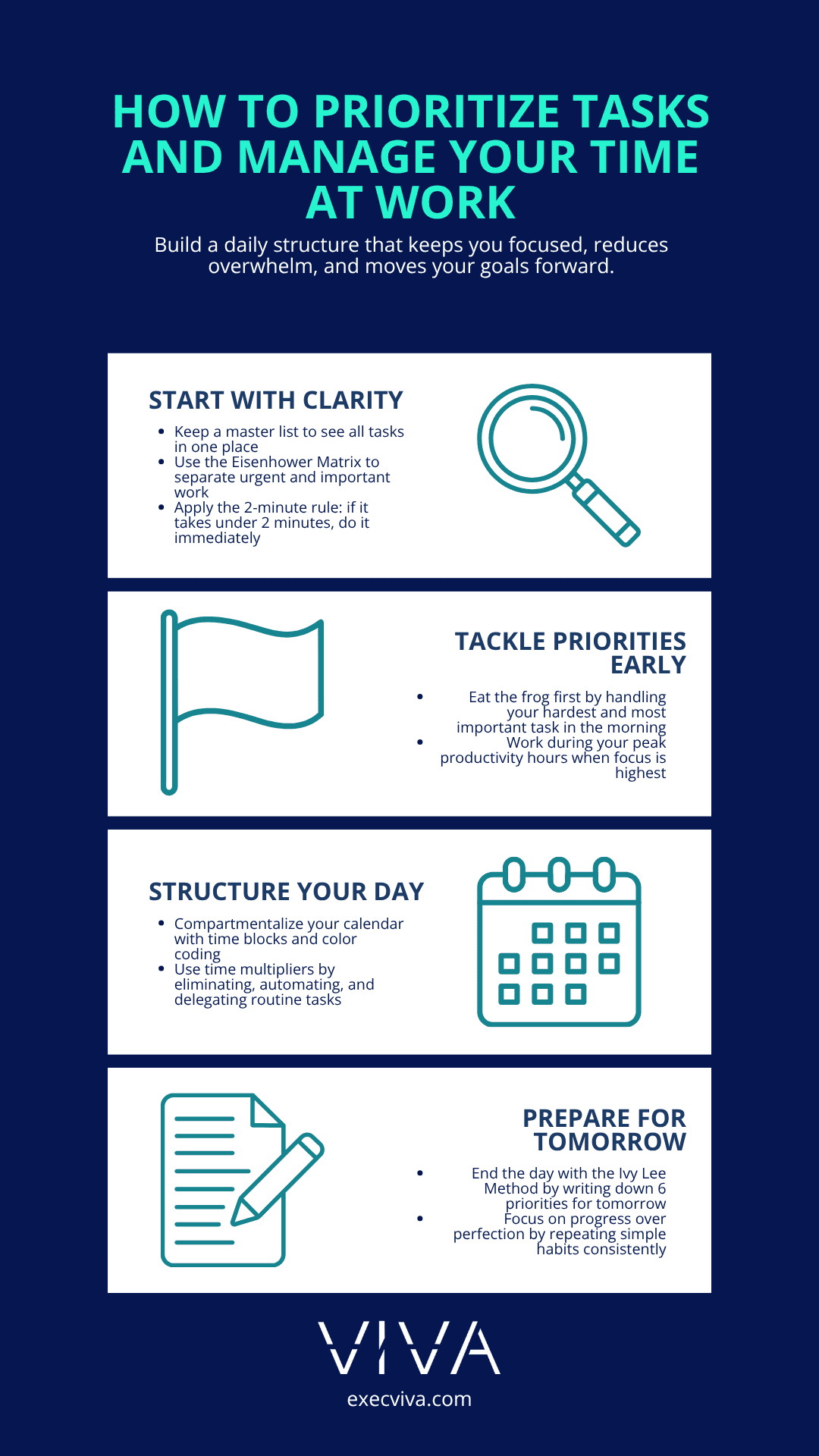
Table of contents:
- Structures that professionals use to prioritize tasks and manage time
- A daily schedule for prioritizing tasks and better time management
- First thing in the morning: Start strong
- Mid-morning: Prioritize and focus
- Noon: Reflect on your time management
- Afternoon: Optimize and execute
- Evening: Plan and recharge
Structures that professionals use to prioritize tasks and manage time
Executive assistants are experts in finding time for the executives they work with. Drawing from their expertise, we’ve crafted a guide to help you get organized, prioritize tasks, and manage your time more effectively—just like a virtual executive assistant would. This is done by adding certain structures to your daily workflow with a positive impact on your productivity.
Here’s a step-by-step daily schedule to help you prioritize tasks effectively from morning to evening using specific structures. You can either do them yourself or ask your EA to do them for you (we recommend the latter so you can focus on strategic work that will drive you forward).
We’ll be diving into these structures:
- Keeping a master list
- Eating the frog for breakfast
- The 2-minute rule
- Eisenhower matrix
- Calendar Compartmentalization
- Time multipliers
- Peak productivity hours
- The Ivy Lee Method
A daily schedule for prioritizing tasks and time management
First thing in the morning: Start strong
Most busy executives will wake up and immediately pick up their phones. Some will check their calendar for the day, others will go directly to their inboxes, and others may check their CRMs to see if any new business has come up while they were sleeping. Either way, for a strong start, keep a master list and eat the frog first.
Keep a master list
Start your workday by reviewing your master list, a key tool for prioritizing tasks and time management. A master list is a document that includes everything from investor meetings to product development updates. This works like a second brain, and allows you to see all your tasks in one place, organized by priority, due date, and status.
Your master list can be as detailed as you want, but make sure it’s easily accessible to you and your executive assistant. This way, you can start the day with a broad perspective of your priorities. Notion is a great place to create this master list because it has easy-to-use tables that can organize, filter, and share your information.
Tip: Keep your master list always open so that when you have an idea for a code review session or a new feature, it doesn’t escape your mind. Prioritize a small win early in the morning and you’ll be motivated for the rest of the day.
Eat the frog for breakfast
Tackle the most important and challenging task first. After assessing your master list, identify your “frog” of the day.
As Mark Twain famously wrote, “If you have to eat a live frog, it does not pay to sit and look at it for a very long time!”
The frog is a task that is large and important like preparing an investor pitch deck (crucial for securing funding but can be daunting). Completing this task first gives you momentum and inspiration for the rest of the day. Many executives would say it’s an investor pitch deck (a crucial task that can sometimes feel daunting) or replying to an upset customer or employee.
Mid-morning: Prioritize and focus
If you’re feeling stuck, try the 2-minute rule
By mid-morning, you might be feeling stuck if you’ve run into too many blocks to completing tasks. To get unstuck, we recommend the 2-minute rule. Using this method consistently, not just when you’re stuck, can help you avoid having too many tasks piled up by the end of the day.
If a task can be completed in two minutes or less, do it immediately. This prevents small tasks from piling up and becoming overwhelming.
For instance, quickly responding to a Slack message to the development team on a minor adjustment or drafting a brief message to your EA to ask them to plan your next trip can clear your mind and keep your to-do list manageable. By handling these quick tasks right away, you maintain focus on larger, more significant projects.
Some executives extend this to the Slack messages they get from their team. They’ve asked their team to use Slack messages only for anything that takes 2 minutes or less to reply to.
Noon: Reflect on your time management
Prioritizing tasks and managing your time isn’t just for mornings. Noon is also a great time to reflect on your tasks, especially when you’re so busy that you feel like you’re not moving forward.
This is a great time to check on your progress. Reflect if by now you’ve accomplished at least 1 small and fast task, eaten your frog, and focused on time management and prioritization. If not, today can be a good time to start on a more meatier time management structure like the Eisenhower Matrix and Calendar Compartmentalization.
Use the Eisenhower Matrix to categorize tasks
The Eisenhower Matrix is one of Viva’s preferred methods of prioritizing tasks. While having a master list allows you to identify tasks, the Eisenhower Matrix allows you to prioritize them. It basically answers the question of what to do first and what to leave for later. With this matrix, some tasks will even be delegated to someone else or eliminated completely.
In basic terms, urgent tasks are things you need to react to right away, like emails, phone calls, texts, or news. Important tasks are ones that contribute to your long-term mission, values, and goals.
Categorize action items after board meetings using the Eisenhower Matrix. This ensures that critical items are addressed promptly, and less urgent items are scheduled appropriately.
You can also delegate email management using the Eisenhower Matrix. Your executive assistant can categorize incoming emails and messages based on urgency and importance, allowing the executive to address high-priority communications first while your EA handles routine or low-priority messages.
Another way to use the Eisenhower Matrix is when your executive assistant is implementing Standard Operating Procedures (SOPs) or improving processes. This prioritization structure can give visibility to what needs to be done first and what doesn’t need to be done at all. It can prevent an EA from working on the wrong thing.
Tip: Focus on tasks that contribute to your long-term goals. Ruthlessly prioritize tasks that will get you there.
Read more on the Eisenhower Matrix and how it works.
Compartmentalize your calendar
Another favorite technique among executive assistants is calendar compartmentalization. This is a technique that allows executives to do one thing at a time by dividing tasks, responsibilities, and thoughts into different areas.
To compartmentalize efficiently, write down your priorities. Next, schedule and color code your calendar. Lastly, work on your priorities, one at a time.
Learn more about calendar compartmentalization and download our template here.
Tip: List out your main tasks for the week, such as product development meetings, investor pitches, code reviews, and team check-ins.
Scheduling and color coding example:
- Product development meetings: Schedule these for Monday and Wednesday mornings, color-coded in blue.
- Investor pitches: Set these for Tuesday afternoons, color-coded in green.
- Code reviews: Reserve Thursday afternoons for code reviews with the development team, color-coded in yellow.
- Team check-ins: Allocate time for daily brief check-ins with your team every week, color-coded in red.
- Focus time: Block out uninterrupted work time everyday for high-priority tasks, such as preparing strategic documents or brainstorming sessions, color-coded in purple.
Afternoon: Optimize and execute
Time management with time multipliers
Time multipliers, developed by Rory Vaden, is a strategy that can help you reach maximum productivity over time. Invest time in activities that will save you time in the future, multiplying your time. It involves:
- Eliminating unnecessary tasks:
- Identify and remove low-value meetings from your schedule. If a weekly status update meeting can be replaced with a quick email, eliminate the meeting.
- Automating repetitive tasks:
- For example, set up automated notifications to remind team members of approaching deadlines.
- Delegating tasks:
- Ask your executive assistant to schedule meetings, manage your inbox, or prepare reports.
- Concentrating on high-impact tasks:
- Focus on strategic activities like developing a new product feature that aligns with your startup’s long-term vision.
- Procrastinating on purpose:
- Intentionally delay less critical tasks, like putting off reformatting internal documents until you have completed your investor pitch.
Prioritize tasks and time management for executives
Prioritize during peak productivity hours
Not all hours of the day are created equally – at least not from an executive’s perspective. Every person has a natural tendency to be productive at certain times of the day. Some executives wake up as early as 5 AM to catch up on unread emails, allowing for a couple hours of uninterrupted focused time.
This technique is not just for early birds. Your productivity hours are the ones that work best for you. The point is to prioritize your highest priorities during those times.
Tip: Use RescueTime to find out what your peak productivity hours are. Your peak productivity hours are typically when most of your coworkers are offline. This allows you to focus on deep work without distractions and take advantage of your highest energy levels.
Evening: Plan and unwind
Use the Ivy Lee Method to plan for the next day
Sometimes, despite our best efforts, we end the day with a massive list of urgent and important tasks that weren’t completed. That calls for the Ivy Lee Method of 6 daily priorities.
Limiting your priorities to 6 per day can help you complete more tasks.
At the end of the day, write down 6 of your tasks and organize them from the most important to the least urgent. Avoid writing more than six.
Tomorrow, concentrate only on the first task. Once it’s complete, move on to the next, and so on. Repeat this process every day.
Conclusion
Every day brings its own challenges, so be patient with interruptions and leave room for imperfections and improvement. Be realistic about your daily goals; it’s better to complete 3 tasks than plan for 15 and finish none.
Use any of these techniques to prioritize your tasks, but remember to enjoy a well-deserved break at the end of the day. Rest and come back tomorrow, refreshed to tackle new tasks.
Once you master time management and prioritization, you’ll realize that much of the work that feels urgent can wait.
While prioritizing is straightforward—knowing which tasks need to be done and ranking them by importance—implementing prioritization can be challenging. When priorities pile up, having a clear structure helps you go from being overwhelmed to being in control.
All of these techniques and strategies to prioritize tasks and time management are especially impactful when you’re working with a virtual executive assistant. An EA can help you implement these approaches, take on some of the responsibilities from your list, and keep you accountable. Book a call with us to find out how an EA can support you.