Executive Assistants
3 automations created by an AI-ready executive assistant
Dec 2, 2025
5 min read


TL;DR
- Viva’s AI-ready executive assistant is trained to be the best in the world at using AI
- Viva EAs leverage Zapier, Notion, and Slack to automate workflows that save 30%–70% of time on critical tasks.
- Viva tracks automation maturity using a clear model: Rookie, Operator, Expert.
- Each stage comes with real-world EA use cases: from two-step Slack Zaps to fully agent-powered PMBs.
- Executives in scaling U.S. tech companies benefit from automation-ready EAs who come with prebuilt systems.
AI-ready executive assistants are indispensable for fast-moving tech leaders. One of our customers actually told us, “I will fire anyone who doesn’t use AI.”
At Viva, we don’t just assign support. We train EAs to build systems using tools like Zapier, Slack, and Notion.
Statista reports that companies using AI across the organization see stronger operational performance and improved talent retention. Integrating AI-driven talent management tools is a key driver of innovation and long-term resilience in today’s business landscape.
This blog captures some of the biggest learnings from Viva’s guest session at Zap Connect 2025, where Senior EA Dania Maduro and Senior People Ops Specialist Arantxa Godinez shared how we’ve scaled AI across our org, embedding automation into everyday workflows.
Table of contents
- What does it mean to have an AI-ready executive assistant?
- How Viva trains EAs to use tools like Zapier, Notion, and Slack
- Three real-world automation use cases from Viva EAs
- What’s the ROI of an automation-ready EA?
- Comparison: The impact of Viva’s automations
1. What does it mean to have an AI-ready executive assistant?
An AI-ready executive assistant doesn’t just manage tasks. They build systems. Viva EAs go beyond calendar invites and email triage. They’re trained to use automation platforms like Zapier and Notion, and they build Slack workflows that eliminate redundant manual work. These are not side projects; they’re part of the core value EAs deliver from day one.
Executives at U.S.-based tech companies need support that scales. That’s what AI-ready EAs deliver. As one of our customers puts it: “I don’t care if my EA does a task or uses ChatGPT to do it.”
AI-ready executive assistants are trained to think in systems. They identify where information gets stuck, where processes break down, and where automation can save real hours, not just minutes. The result is support that goes far beyond the inbox.
2. How Viva trains EAs to use tools like Zapier, Notion, and Slack
A recent Harvard Business Review study found that GenAI-powered, personalized learning experiences lead to higher training engagement and can improve skill development by up to 15% compared to traditional methods.
At Viva, we developed an AI Maturity Model to guide our EA automation enablement:
a. Rookie (Tool User):
- EAs use ChatGPT for basic email rewrites or create simple two-step Zaps
- Productivity gains are real but inconsistent
- Adoption tends to be individual and undocumented
b. Operator (Systems Builder):
- EAs build SOPs that include AI agents and cross-tool Zaps
- Workflows connect Slack, Notion, Google Drive, and other tools
- EAs start tracking time saved and iterating workflows based on results
c. Expert (Automation Leader):
- EAs deploy intelligent agents for end-to-end processes
- PMBs, customer briefings, and follow-ups are automated at scale
- AI becomes embedded in team rituals, not a one-off experiment
Every EA is enrolled in AI onboarding sessions, tooling tutorials, and quarterly workshops to deepen their fluency. Office hours, live demos, and a dedicated AI Use Case Repository provide the real-world knowledge to move fast.
3. Three real-world automation use cases from Viva EAs
a. Meeting reminder Zap (30% more on-time attendance)
Our first automation solved one of the most common problems in scaling tech companies with high demands on execs: missed meetings. Even with calendar alerts, EAs told us execs were still slipping, especially on days full of context switching. The solution? A lightweight but high-impact Zap.
Workflow:
- Trigger: Google Calendar event (10 minutes before)
- Filter: Internal 1:1s or team syncs
- Action: Slack DM or channel message
Impact:
- On-time attendance rose by 30%, especially on high-context-switch days
Scalable variations:
- Auto-alert when meetings are cancelled
- Only ping for high-priority meetings (e.g., board or customer calls)
- Push post-meeting action items to Slack automatically

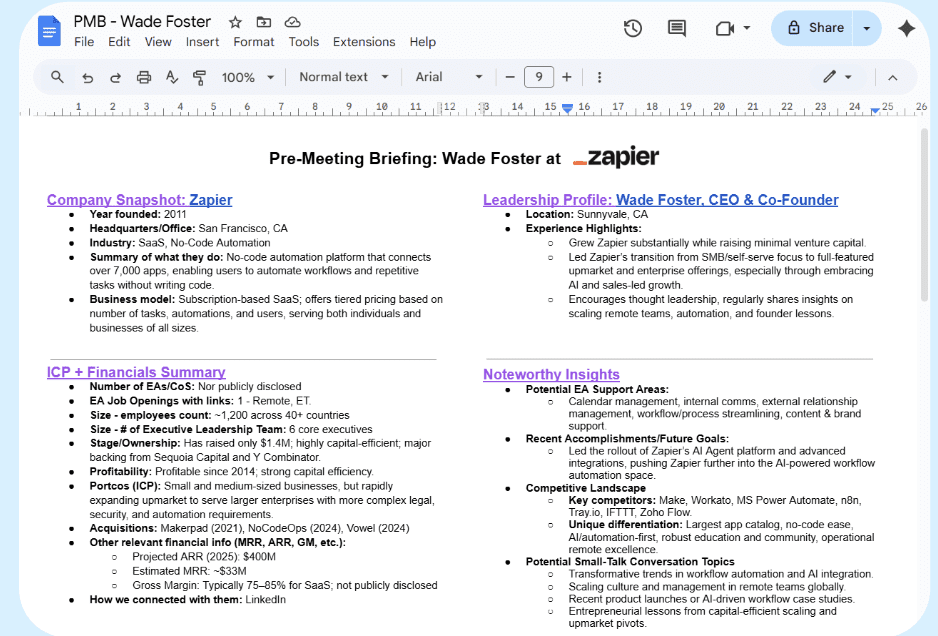
b. Pre-meeting briefing (PMB) automation (70% time saved)
Pre-meeting briefings used to take hours of repetitive research. So we challenged our team: Could we build the entire process in Zapier? The first version was simple but effective; then it evolved.
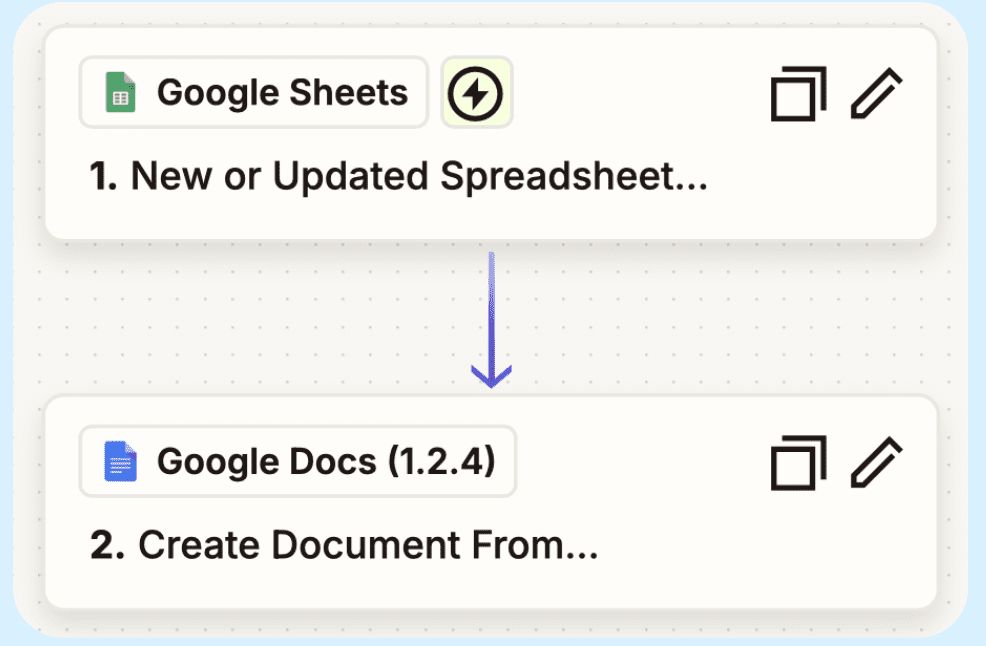
V1: Basic Automation
- Trigger: New row in Google Sheet
- Action: Populate a PMB doc in Drive
No one started from scratch anymore. Every EA had a standardized structure ready in minutes.
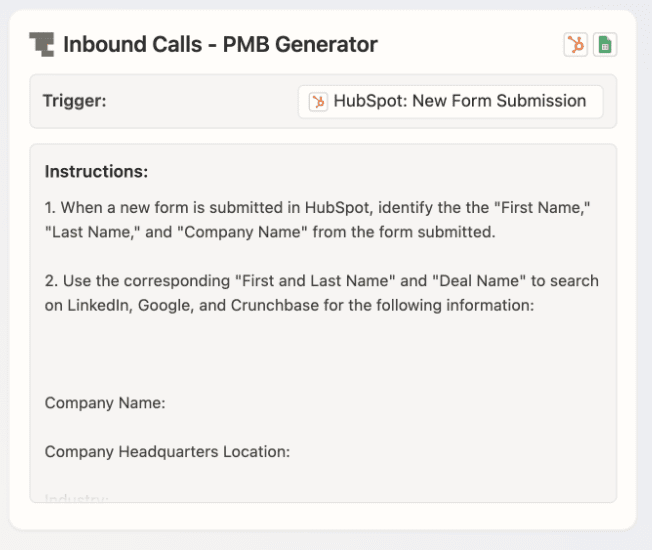
V2: Agent-driven flow
- Trigger: HubSpot form submission
- Action 1: Agent enriches company data
- Action 2: Match to internal Excel
- Action 3: Create Drive folder with PMB, intro deck
- Action 4: Email summary to Account Executive
Impact:
- PMBs now take 70% less time, with zero manual file handling
- This became one of the most adopted automations across the org
- Cultural ripple: EAs started asking, “What else can Zapier handle for us?”
c. Follow-up automation (50% less time spent)
Post-meeting follow-ups are critical—but always rushed. This build tackled that pain point directly, ensuring consistent communication with minimal manual effort.
Workflow:
- Trigger: New meeting transcript
- Action 1: Agent drafts polished customer email
- Action 2: Slack DM to EA with internal notes
- Action 3: Highlight post in Customer Impact channel

Impact:
- 50% reduction in time spent writing follow-ups
- Each meeting now generates three outputs automatically: customer email, internal summary, and org-wide recognition

All three outputs happen instantly and automatically. The system ensures no detail is lost, and nothing slips through the cracks.
4. What’s the ROI of an AI-ready EA?
Deloitte’s 2025 survey about AI ROI shows that 85% of organizations have increased their AI investments, with top performers moving to CEO- and manager-led rollouts to maximize business impact. This leadership-driven approach consistently drives higher adoption and broader organizational buy-in.
Part of the ROI of an AI-ready EA is the fact that they act as multipliers by helping the entire team with automation adoption. One of the executives we support said it best: “If my EA can automate their own workflow, that’s a good thing that’ll make them a bigger asset to the team.”
Impact:
- 30%–70% time savings on high-effort, low-leverage tasks
- Faster ramp-up (Viva EAs come AI-trained)
- Better meeting attendance, prep, and follow-up
- Higher consistency in operations and documentation
- Cultural shift: EAs drive tech adoption org-wide
When executives delegate follow-ups, customer briefs, and meeting logistics to automated systems, not just people, they recover dozens of hours per month. Viva EAs don’t just complete tasks faster; they remove tasks entirely.
5. Comparison: The impact of Viva’s automations
| Automation Use Case | Time Saved / Improvement |
| Slack meeting reminder | +30% on-time attendance |
| Pre-meeting briefings | 70% time savings |
| Follow-up workflows | 50% time savings |
Every one of these improvements started with a real executive problem. Viva EAs didn’t just solve them, they built sustainable systems that scale. And that’s the real difference.
FAQ
How much does a virtual executive assistant cost in the U.S.? Viva’s assistants cost $3,999/month for 1 executive or $4,999/month for up to 2 executives, with custom pricing for larger teams, all full-time and fully managed.
What tools do Viva EAs use for automation? Zapier, Slack, Notion, Google Drive, and ChatGPT are the main tools. Training is provided continuously.
How fast can I hire a virtual EA from Viva? Most execs are matched within a week and see value within 1–2 weeks.
Is remote executive support secure? Yes. Viva implements strict data handling protocols and offers secure integrations across all supported tools.
Do Viva EAs only support individual executives? Most Viva EAs support 2–3 execs each, often across different functions.
Book a call with Viva Executive Assistants to see how quickly your EA can start delivering results with an AI-ready executive assistant.
.