Executive Assistants
How can your assistant become an AI executive assistant?
Jun 26, 2025
5 min read


AI is everywhere. You can’t escape it and, frankly, why would you? AI can make your life easier, and if you already have an assistant, turning them into an AI executive assistant will make your job so much easier. You may still obsess over how to reach and even surpass the company’s north star, or spend your Sundays planning your week, but let that be a product of your deep passion for what you do, not for a lack of time.
There are many AI tools your EA can start using, but we asked some of our executive assistants about the ones that really make a difference for their job and their executive’s productivity. These are the tools they swear by: ChatGPT, Perplexity, Zapier, Gemini, Vimcal, and Notion AI.
Table of contents:
- How can your assistant use ChatGPT to manage your inbox?
- How can your assistant help take care of your customers using Perplexity?
- How can your assistant use Zapier to help with Slack?
- How can your assistant use Gemini and other tools to handle meeting notes?
- How can your assistant use Vimcal to schedule across time zones?
- How can your assistant use Notion AI to build better documentation?
1. How can your assistant use ChatGPT to manage your inbox?
ChatGPT is, without a doubt, the most popular LLM right now. People use it to create images of themselves in a specific artistic style, teach themselves a language, and even make grocery lists for the entire week. In the world of executive assistants, this tool is useful for many tasks, but let’s focus on a critical one: handling your email.
Daniela, one of our executive assistants, recently shared a whole range of ways she uses ChatGPT with her customer when it comes to email: to categorize and triage emails, filter out spam and clean up their inbox, to write exec-ready reply options, to prep quarterly outreach messages, and to pre-write a quarterly inbox cleanup plan.
This is only one of the prompts she uses to clean up her executive’s inbox:
Prompt
You’re cleaning up an executive’s inbox. Identify newsletters, auto-notifications, and outdated threads. Summarize what can be safely archived or unsubscribed.
To make it work, she includes a sample list of inbox items or exported email metadata (subject/sender/date). If you’re curious about her other prompts or other ways an AI executive assistant can help out with email, you may want to talk to our team and find the best EA for your needs.

2. How can your assistant help take care of your customers using Perplexity?
Your first instinct is probably to jump in yourself when a customer is at risk of churning. But what if you don’t have the capacity? Who do you delegate such a sensitive matter to? Our advice is to trust your EA to manage this issue. You might assume your executive assistant isn’t close enough to the business to help, but they don’t need to know everything upfront. What matters is their curiosity, resourcefulness, and ability to tap into trusted sources.
One of our executive assistants recently supported a customer facing exactly this kind of challenge. The customer, a green energy startup, suddenly found itself trapped by new government regulations that threatened its revenue and created growing stress across the team.
Instead of stepping back, the executive assistant took the initiative to learn. She used Perplexity to quickly research how the new regulations would impact the company and uncovered insights that proved invaluable. In doing so, she became an exceptional AI executive assistant: someone who taught herself the context, asked the right questions, and grew into a true thought partner for her executives.
3. How can your assistant use Zapier to manage your Slack?
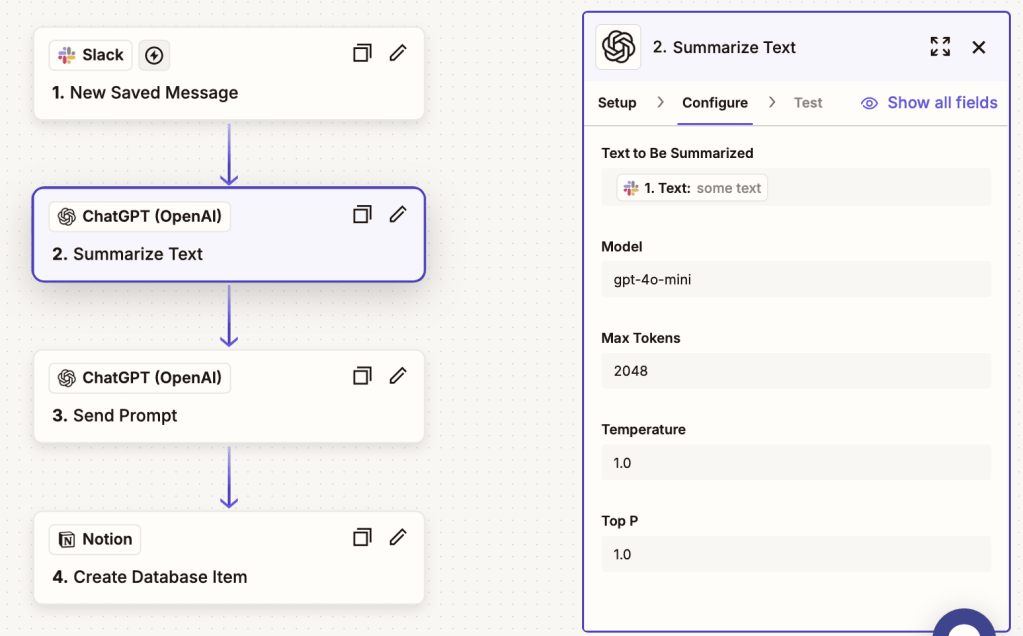
There are many ways to delegate your inbox, but did you know you can delegate Slack to someone else, too? The short answer is no, but the full answer is: yes, if they know how to use Zapier. We recently wrote a blog with step-by-step instructions on how to delegate Slack to your executive assistant.
Let’s say you get a Slack message asking you to send a report, provide your preferred travel info, or finish a board meeting slide. All you have to do is save the message, which will activate a sequence, land in a Notion database and reach your EA, who will seamlessly take care of all those tasks.
Make sure you establish a way of communicating task completion, and you’re good to go. No more forgotten Slack messages, and all the tasks completed.
4. How can your assistant use Gemini and other tools to handle meeting notes?
If your executive assistant attends all your meetings (which we strongly suggest), make sure they do more than take notes manually. As Caitlin Huerter, EA to the CRO at Vanta recently told us, EAs are the emotional intelligence side of the room. While the exec is focused on content and delivering in a meeting with 40 people, their EA is reading the room: Who’s engaged, who’s checked out, who’s rolling their eyes in the back? That observational insight is powerful, and a trusted exec will come to rely on it.
But note-taking is an important part of meeting tasks, and we asked some of our EAs about their preferred tools ,. The majority of them recommended Gemini, but Otter.AI and Fireflies were other favorites. Ask your EA to explore all three tools and choose the best one for your needs. Once they’ve identified the most functional tool for you, you’ll be confident that nothing is falling through the cracks.
5. How can your assistant use Vimcal to schedule across time zones?
Scheduling across teams and customers in different time zones can be a time-consuming task. Vimcal is a powerful tool that helps assistants find meeting overlaps fast, without the usual back-and-forth emails. Sarah, one of our executive assistants, supports three executives at a Series D startup and she uses Vimcal daily to manage complex calendars across three time zones.
To make the most of it, encourage your assistant to get familiar with Vimcal’s time zone features and keyboard shortcuts, like pressing Z to quickly toggle between time zones or using Cmd + K (Mac) or Ctrl + K (Windows) to instantly search for people, events, or time zones. These small habits can significantly speed up scheduling and reduce friction for everyone.
6. How can your assistant use Notion AI to build better documentation?
Notion AI isn’t just for writing; it’s a powerful tool your assistant can use to build and maintain organized, useful documentation. One of our executive assistants supports a fast-growing startup and uses Notion AI to create living dashboards that help her executives stay aligned. For example, she’s built a customer tracker with notes and preferences, a project dashboard that updates automatically, and a team directory with onboarding steps.
With Notion AI, your assistant can quickly summarize meeting notes and add them directly into these databases, keeping information clear and up to date. Encourage your assistant to explore commands like AI/Summarize to generate quick summaries and /Database to start building structured, searchable documentation that saves everyone time.
Becoming an AI executive assistant isn’t about using every tool. It’s about choosing the right ones to support you better. When your assistant knows how to work with AI, they can take more off your plate, help you move faster, and give you back focus time. Want an EA who helps you do just that? Talk to our team and meet your next AI executive assistant.